Bid Adjustments for Device, Location, and Dayparting in B2B
B2B teams can price intent correctly by adjusting bids for device, location, and dayparting.

If you have spent any real time running paid search for a B2B company, you already know the gut-punch moment. You pull the device performance report, and mobile has eaten a meaningful chunk of your budget. Conversion rate on mobile: somewhere around half of desktop. Pipeline from those mobile conversions: nearly zero. You did not make a targeting mistake. You made a pricing mistake. You priced a low-intent click the same as a high-intent one.
That is what bid adjustments are actually for. Not generic optimization. Pricing intent correctly.
But here is where it gets interesting. The three levers most B2B teams actually have access to (device, location, and dayparting) each map to a specific, observable behavioral pattern in how buying decisions happen inside companies. And most teams treat them like volume knobs instead of what they actually are: a framework for concentrating spend on the moments that produce pipeline.
This piece is about building that framework. It is also straightforward about where automation has changed what these levers can actually do.
How Smart Bidding Changes What Manual Bid Adjustments Can Still Do
Most active Google Ads campaigns today run on some form of Smart Bidding. Target CPA, Target ROAS, Maximize Conversions. If yours does, you need to understand something upfront: several of the adjustments we are about to discuss behave differently under automated bidding than they do under manual CPC.
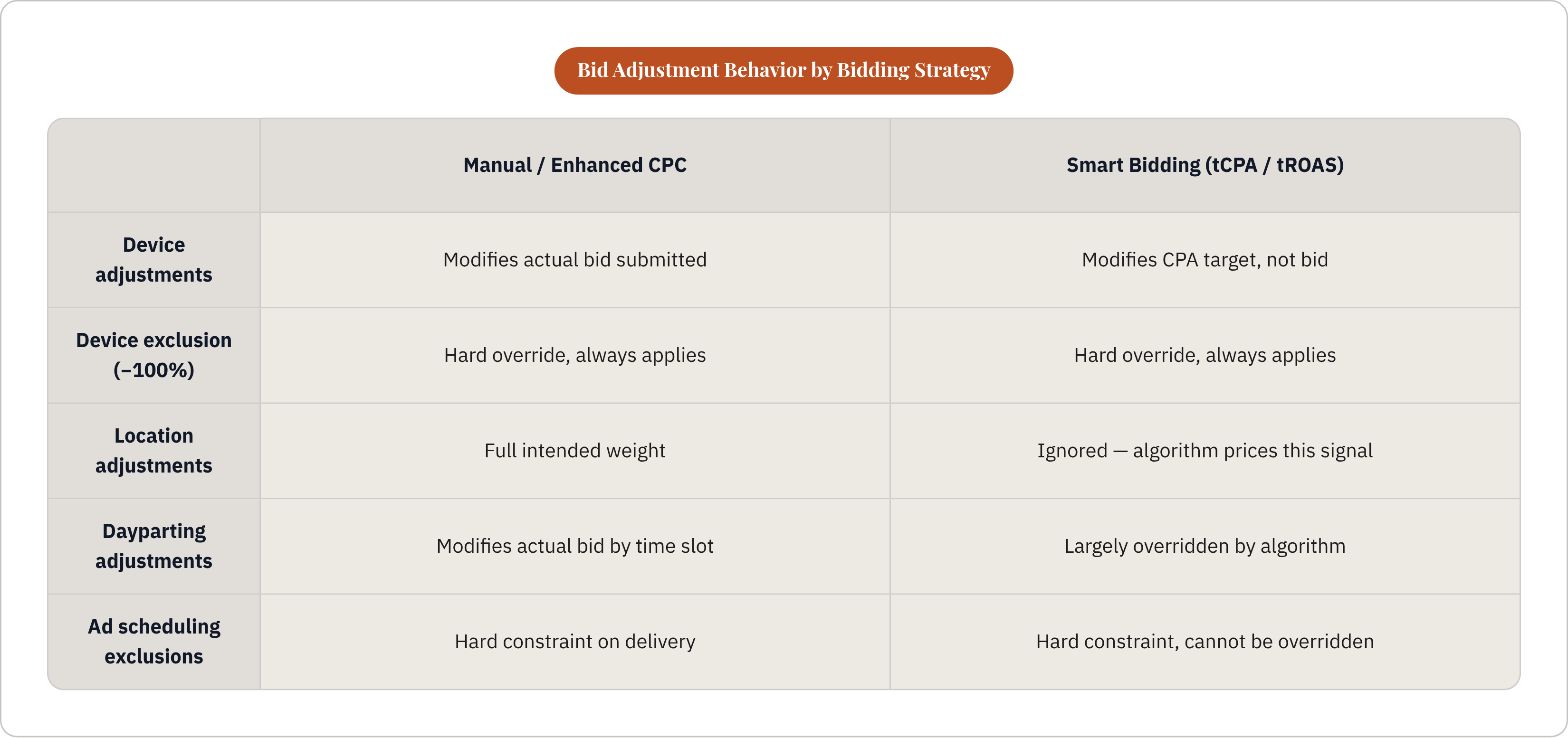
Under manual or Enhanced CPC, a bid adjustment modifies the actual bid submitted at auction. Simple enough. Under Smart Bidding, Google's model already uses time-of-day, geography, and device as auction-time signals. So when you layer a manual location or dayparting adjustment on top of Target CPA, Google largely ignores it. The algorithm has already priced those signals in.
What still functions under Smart Bidding?
- Device adjustments for Target CPA. They modify the CPA target, not the bid itself. A +15% device adjustment tells Google you will accept paying 15% more per conversion on that device. That is a different thing than bidding 15% more.
- The -100% device exclusion. This one works regardless of bidding strategy. It is a hard override.
- Ad scheduling as an exclusion. Removing a time slot entirely, or setting it to -100%, keeps ads from running even when bid-level adjustments are otherwise overridden.
What does not work: applying a positive location adjustment on top of Target CPA expecting it to increase bids in that geography. Google has been explicit about this. It will not be supported.
So the practical reframe is this. Under Smart Bidding, adjustments function primarily as guardrails and exclusions. Under manual or Enhanced CPC, they carry their full intended weight.
There is one more thing worth knowing. Smart Bidding requires enough conversion data to function reliably. Google suggests at least 15 conversions in 30 days; the practical minimum for stable optimization is closer to 50, per the brief's sourced guidance. Many B2B campaigns (especially those with long sales cycles, high-ticket deals, and consistently low conversion volumes) may not reach that threshold. That is exactly when manual adjustments matter most. The algorithm is not broken in those cases. It just does not have enough signal to do its job well.
Google is also continuing to move toward more automation. A new bidding tool launched in mid-2026, with additional system changes rolling out shortly after. The trajectory is clear. The practical skill going forward is not learning to outbid an algorithm manually. It is knowing when to steer and when to constrain.
Device Adjustments in B2B: Why Desktop Dominance Is Real and How to Act on It
Here is something that sounds obvious once you say it out loud. Demo requests, consultation bookings, whitepaper downloads (the conversion actions that actually feed a sales pipeline) happen at a desk, during work hours, not on a phone during a commute.
This is not a hunch. If you pull device segmentation in a B2B lead gen campaign and look at conversion rate by device, the gap is usually significant. One benchmark in the brief puts desktop converting at roughly 5% and mobile at 2.8%. That alone justifies a -40% to -50% mobile adjustment. If mobile conversion is near zero, the case for -100% is real.
But before you go to -100%, ask one question first. Does mobile appear anywhere in the conversion path, even if it is not the device that closes the conversion?
Research-on-mobile, convert-on-desktop is a legitimate B2B behavior pattern. Think of mobile as the door that desktop walks through — the first touch that makes the second one possible. A VP reads your ad on their phone during lunch, does not fill out the form, then comes back on desktop later and converts. If mobile shows up as an assist but not a closer, a heavy negative adjustment (say -60% to -70%) may serve better than full exclusion. You would be suppressing mobile spend while preserving some visibility in the path.
How to actually set the adjustment:
- Pull device performance segmented by conversions and conversion rate, not just clicks
- Calculate cost per pipeline-ready lead by device, not cost per form fill. A mobile form fill that never enters the sales process has an infinite true CPA
- Set the adjustment to bring effective CPA on lower-performing devices in line with your target. Or exclude entirely if conversion rate is near zero
One platform note worth flagging. LinkedIn does not offer device bid adjustments. Its algorithm manages delivery across devices automatically. The only device-level control available on LinkedIn is campaign-level targeting (mobile versus desktop) not bid modification. If you are running LinkedIn campaigns and want desktop-only delivery, you are making that choice at the targeting level, not the bid level.
Location Adjustments in B2B: Concentrating Spend Where Buyers Actually Work
Consumer location targeting is mostly about physical proximity. Are you close enough to a store? A restaurant? A service area? B2B location targeting is about something structurally different. It is about where decision-makers are concentrated.
A B2B SaaS company selling to financial services firms has a very different geographic profile than one selling to regional retailers. The adjustment should reflect that concentration. Not national averages. Not intuition. Actual ICP density.
The adjustment range in Google Ads is wide. Bids can be reduced down to 10% of the original, or increased up to ten times it. Most B2B teams use this range timidly, and that is a mistake. A +10% adjustment to a high-value metro rarely moves the needle at the volumes most B2B campaigns run. The practical guidance from the sourced benchmarks in this brief: +10% to +30% for high-performing locations, -20% to -50% for consistently poor-performing ones, and full exclusion for geographies that have not produced pipeline.
How do you identify which locations deserve upward adjustments?
- Start with ICP geography. Where are your existing customers and best-fit prospects actually headquartered?
- Cross-reference with campaign data. Pull the location report in Google Ads segmented by pipeline outcomes, not just conversions. A location generating form fills but zero sales opportunities may not deserve a positive adjustment.
- Think about industry clustering. Finance concentrates in certain metros. Tech concentrates in others. Healthcare has its own regional hubs. These clusters often outperform average campaign performance before any adjustment is applied.
That raises an important caveat. If you are running Target CPA or ROAS, manual location adjustments are not supported and will be ignored. Location performance under Smart Bidding is handled as an auction-time signal by the algorithm. The practical lever in that case becomes audience lists tied to location, or splitting budget across separate geo-targeted campaigns instead of adjusting bids within one.
On LinkedIn, location works at the targeting level (country, region, metro). It is not a bid modifier. Concentrating LinkedIn spend on high-ICP geographies means tightening the audience, not adjusting a percentage.
Dayparting in B2B: Matching Ad Delivery to When Buyers Are Actually Working
The behavioral premise here is probably the easiest one to accept. B2B buyers make purchasing decisions at work, during work hours, on workdays. Demo requests and consultation bookings do not spike at 10pm on a Saturday. Spending budget on those moments is a quality problem disguised as a reach problem.
The sensible baseline for B2B is weekday, business hours delivery. But "baseline" is not "finished." The right dayparting schedule comes from your actual conversion data, not from general B2B assumptions.
What the data often shows when you pull it:
- Conversion rates peak mid-morning, roughly 9–11am, and again early afternoon, roughly 1–3pm, on weekdays
- Weekend and late-evening impressions generate clicks at near-zero pipeline conversion rates
- The "When: Day and Hour" report in Google Ads, segmented by conversions and conversion rate, shows you this clearly. Run it over at least 60–90 days to get statistically stable numbers
Under Smart Bidding, manual dayparting bid adjustments are again largely overridden. The model already uses time-of-day as a signal. But ad scheduling exclusions still work. Removing a time slot entirely is a hard constraint the algorithm cannot override.
There is a practical use case for this that goes beyond bidding efficiency. If your SDR team only works Monday through Friday during business hours, and a lead goes cold over the weekend before anyone can follow up, you have a response time problem. The mechanical fix is to exclude overnight and weekend hours from your ad schedule entirely, so leads generate when someone can actually act on them.
The LinkedIn gap here is real and there is no workaround. LinkedIn has no native dayparting. No hour-level bid adjustments, no scheduling controls. The delivery algorithm paces campaigns autonomously across the day. The only workaround (manually pausing and re-enabling campaigns) is not realistic at scale. For LinkedIn, quality control at the time-of-day level is simply not available. It has to happen at the audience and creative level instead.
One operational detail that compounds quietly. B2B campaigns targeting multiple time zones need ad schedules set per timezone. Business hours in New York is 3am in London. If you are running a national or international campaign and your schedule is set to a single timezone, "business hours" delivery means something very different depending on where the impression is served.
How the Three Adjustments Interact and Compound When Applied Together
This is the part most people skip, and it is where real mistakes happen.
Google multiplies all active bid adjustments to calculate the final bid. Not adds them. Multiplies. Take a base bid of $5.00. Add a +20% location adjustment for a high-ICP metro. Add a -40% mobile device adjustment. Add a -30% off-hours dayparting adjustment.
The math: 1.20 × 0.60 × 0.70 = 0.504. The effective bid is roughly $2.52. Not $3.50, which is what you would get if you added the adjustments together. Compounding. Stacking adjustments without understanding the multiplication can dramatically under-bid in some combinations and over-bid in others.
But what if the compounding is intentional?
Think about it in terms of intent quality rather than individual signals. The highest-quality B2B impression is desktop, high-ICP metro, weekday mid-morning. That combination warrants your highest effective bid. If adjustments are set correctly, the multiplication should produce a number above your base bid. The lowest-quality impression is mobile, low-performing geography, weekend evening. Stacked negative adjustments should produce a bid low enough that Google rarely enters the auction. Or use -100% exclusions to guarantee non-delivery.
A practical example of this working well. A B2B software company aligns its schedule to weekday morning click spikes, pairs that with desktop prioritization, and applies positive adjustments for their highest-ICP geographies. The same budget now buys more pipeline-relevant impressions. Not because any individual adjustment is dramatic. Because the combination compresses spend into the highest-converting moments.
A few things to review on a regular basis, not just when you set the adjustments:
- Device performance shifts as your product evolves. A new mobile-responsive landing page can change mobile conversion rates meaningfully.
- Geographic performance shifts as your ICP or sales territory changes.
- Seasonality affects dayparting. A campaign running during a major industry conference may see hour-level patterns that look nothing like your baseline.
Under Smart Bidding, the compounding concern is less acute because most adjustments are overridden anyway. But the exclusions (−100% for off-hours, −100% for mobile) still stack and must be set intentionally.
Building the Adjustment Layer Into a Pipeline-Accountable Campaign Structure
Here is the measurement problem. Most B2B teams evaluate bid adjustments against CPL or CPA. Those are not the right metrics.
A -40% mobile adjustment that reduces mobile leads by 60% but leaves pipeline-qualified opportunities flat (or improves them) is working. But that only becomes visible if pipeline data is connected to campaign data. If you are looking only at CPL, the adjustment looks like it reduced volume without a corresponding cost benefit. You might reverse it. And that would be the wrong call.
This is the structural challenge with using bid adjustments to improve pipeline quality over volume. The signal you are optimizing for is further downstream than the signal most reporting is set up to capture.
A few things that make this work in practice:
- Connect CRM outcomes to campaign data. Opportunity created, opportunity stage, closed-won. These need to flow back to the campaign or ad group level, not just sit in Salesforce. UTM parameters and offline conversion imports are the most common mechanism.
- Evaluate adjustments at the pipeline level, not the lead level. The right question is not "did this adjustment reduce leads?" It is "did this adjustment change the ratio of leads to pipeline-qualified opportunities?"
- Set a review cadence. Quarterly is a reasonable minimum. Adjustments set six months ago may reflect a geographic or device reality that no longer exists.
One argument worth taking seriously: some B2B marketing teams will say this level of adjustment is unnecessary if the campaign is running on Smart Bidding. And to be fair, there is something to that. The algorithm is pricing device, location, and time-of-day at the auction level already. It is doing some version of this work automatically.
But Smart Bidding is only as good as the conversion signal you feed it. If the conversions you are optimizing toward are form fills rather than pipeline-qualified leads, the algorithm will optimize toward form fills. It will find the cheapest form fills, regardless of whether those form fills ever become sales opportunities. The adjustment layer (particularly exclusions) is the mechanism for correcting that mismatch at the structural level.
The algorithm steers toward what you measure. Bid adjustments let you constrain where it is allowed to go.
That is the real argument for treating device, location, and dayparting as a framework rather than a checklist. Each one is a specific behavioral signal about where qualified B2B buyers tend to be, when they are typically working, and what device they are converting on. Pricing those signals correctly is not a tactical detail. It is the difference between a campaign that generates volume and one that generates pipeline. Sales-led B2B teams that want this layer handled without owning it themselves have options, such as Thunder, an applied-AI company whose agents run Google and LinkedIn Ads end to end for B2B companies, with a flat retainer and no incentive to inflate spend.