Google Ads and CRM Integration for Pipeline Reporting
Connect Google Ads to your CRM to stop optimizing for junk leads and start chasing real revenue.
The dashboard says everything is fine. Cost per lead came in at target, the quarterly goal is hit, and the team is ready to call the quarter a win. Three months later, sales reports that almost nothing from paid search turned into a real conversation, and even less of it closed into a deal. Nobody touched the keywords. Nobody changed the bids. What happened is simpler and harder to fix: the account had been telling Google's algorithm to optimize for the wrong thing the entire time, and the algorithm did exactly as it was told.
Marking "demo request submitted" as the primary conversion action tells Smart Bidding to find the cheapest path to a form fill, with no way to distinguish a qualified buyer from a student with a burner email. Layer on a second problem: Google's default conversion window is 30 days, while the median B2B SaaS sales cycle runs well past that. Any deal that closes after day 30 is invisible to the algorithm. The campaigns that actually produced that revenue get starved of budget, because as far as Google can tell, they produced nothing.
Meanwhile marketing is watching CPL in Google Ads, sales is watching pipeline in Salesforce or HubSpot, and the two numbers never meet in the same room. That mismatch builds slowly and quietly, until leadership asks why all that lead volume didn't turn into revenue, and nobody has a clean answer.
A B2B SaaS account spending well into five figures a month illustrates how far this can go. The primary conversion action was a gated PDF download. For more than a year, Google's algorithm got very good at finding people who like downloading free content, and the sales team concluded that paid search simply doesn't work for this business. The campaigns weren't broken. The instructions handed to them were.
How the gclid-to-CRM pipeline works
Offline conversion tracking is the baseline infrastructure that lets Google's algorithm see what a genuinely valuable conversion looks like, instead of guessing.
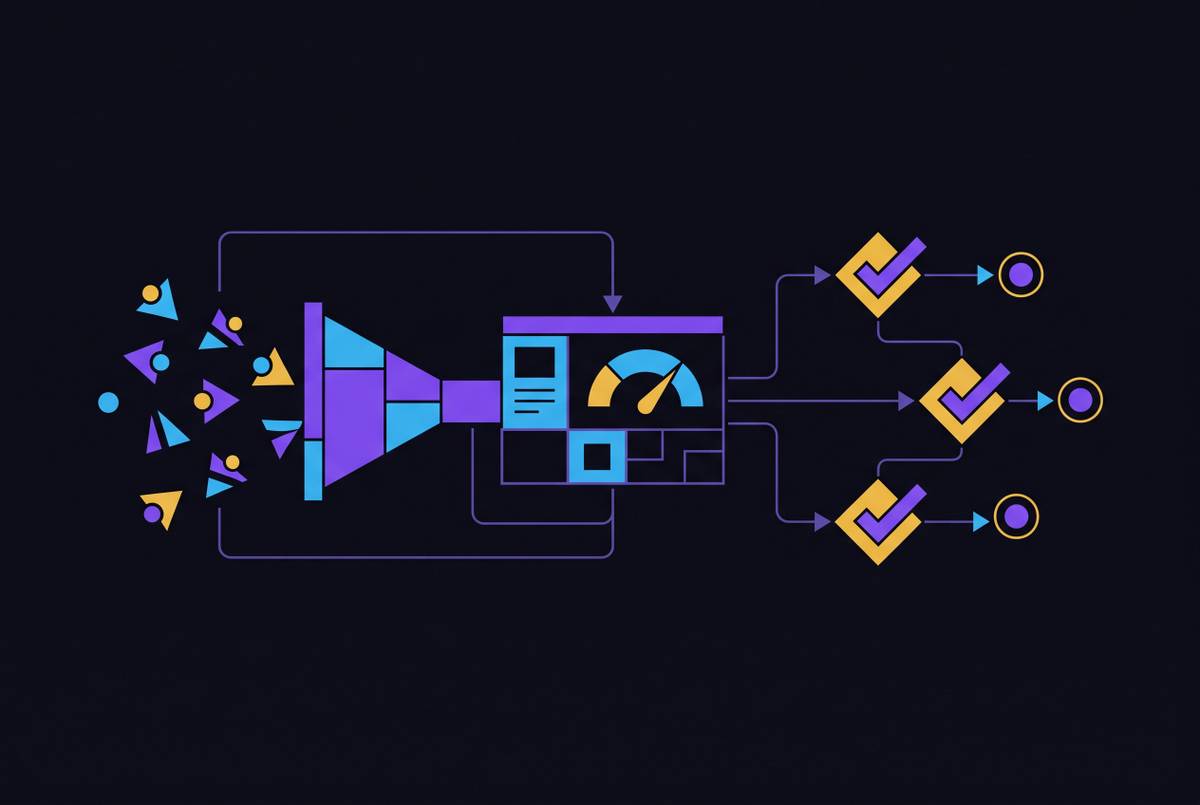
The mechanism starts with something Google already generates: a unique click ID, the gclid, attached to every single ad click. That ID needs to be captured the moment someone fills out a form, then stored as a field on their contact record inside Salesforce or HubSpot. From there, the lead moves through the stages any sales team recognizes, MQL, SQL, Opportunity Created, Closed-Won, and each of those stage changes gets imported back into Google Ads as its own conversion action, carrying its own value. A Closed-Won deal might import at actual contract value or a strong proxy for it, giving the algorithm a real number to chase instead of a binary "form filled, yes or no."
Getting the data to flow back doesn't require custom engineering. It can run through a direct CRM integration, through middleware like Zapier, or through Google Ads Data Manager, and the choice between them matters far less than actually doing it, consistently, on every lead.
Three details in this setup are easy to miss and expensive when missed. If you don't extend the attribution window well past Google's 30-day default, you miss most B2B conversions outright. GCLIDs expire after 90 days, so if your enterprise sales cycle runs longer than that, you need a deliberate workaround rather than hoping the math works out. Once differentiated values flow back, you can turn on value-based bidding, and Smart Bidding then chases weighted revenue signals instead of raw conversion counts. Value-based bidding gives Smart Bidding a different optimization target entirely than the old one.
Performance Max and Smart Bidding with real pipeline signals
Without CRM data flowing back, Performance Max defaults to optimizing for the cheapest form fills it can find, which are, structurally, the least qualified leads in the funnel. That builds a feedback loop that gets worse the longer it runs, not better.
B2B Performance Max campaigns need offline conversion tracking, ICP signal feedback, and value-based bidding working together, or they waste a large portion of the budget on search partners and display placements that generate unqualified traffic.
Smaller accounts face a data volume problem: fewer than 30 high-value conversions a month isn't enough signal for Smart Bidding to learn from reliably. The fix is a micro-conversion ladder, intermediate signals like pricing page visits, case study downloads, and ROI calculator completions, that give the algorithm enough to work with without collapsing back into optimizing for junk.
Broad match can actually work well in a B2B account, but only once the algorithm has a real revenue signal disciplining its decisions. If you strip that signal away, broad match in B2B categories floods the account with consumer traffic and irrelevant clicks that look fine on impressions but land terrible on pipeline.
Campaign structure that reflects buyer intent rather than keyword themes
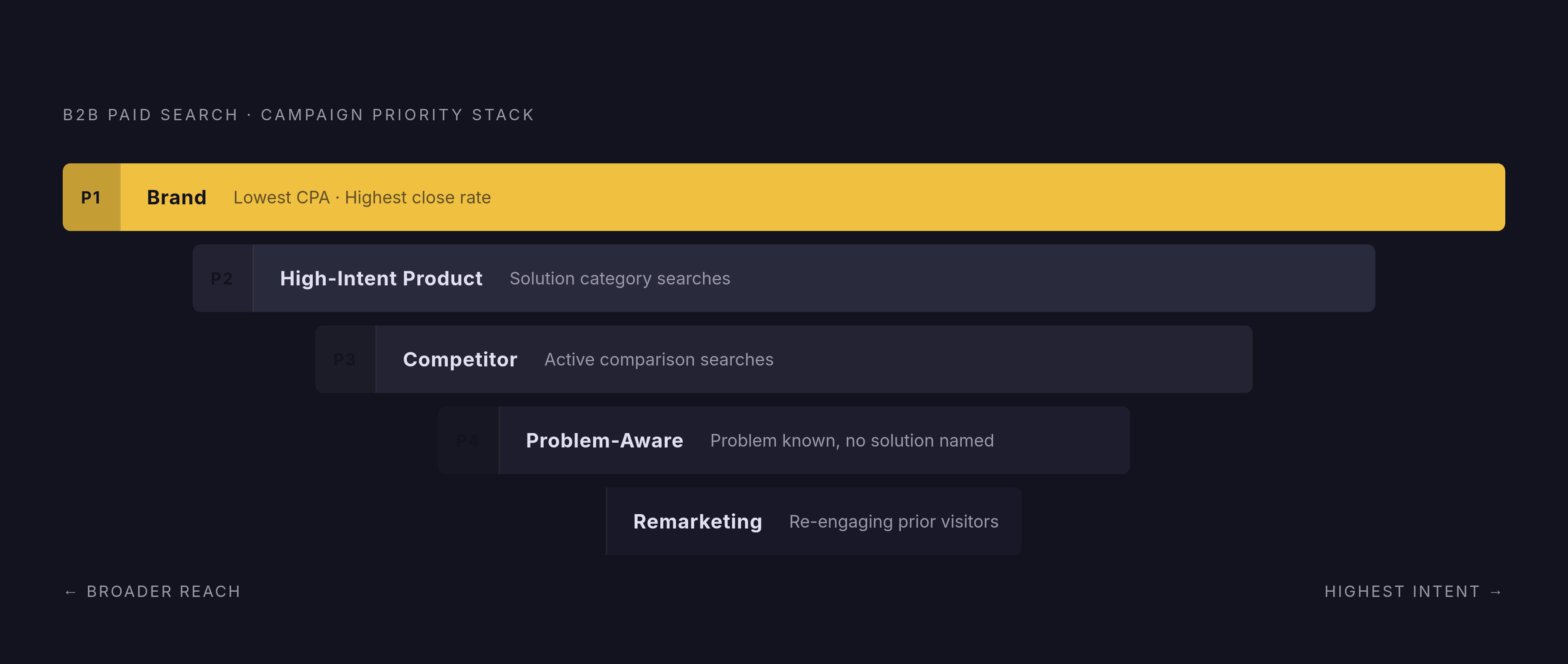
Once pipeline data is actually flowing back into Google Ads, you have to ask whether campaign structure reflects how buyers actually move, instead of just which keywords got grouped together in a spreadsheet. Structure should map to buyer intent stages so budget lands on the signals most likely to turn into pipeline, instead of being split along keyword themes that have nothing to do with where a prospect sits in their decision.
A useful way to organize this is five intent-based tiers, funded in priority order. Brand is the top tier, protecting branded terms at the lowest CPA and the highest close rate of any tier. High-Intent Product campaigns come next, and they target bottom-funnel buyers who are already searching for the solution category by name. Competitor campaigns target prospects who are actively comparing alternatives, so they need their own distinct messaging instead of a copy-paste of the product campaign. Problem-Aware campaigns reach buyers who know they have a problem but haven't yet named the solution for it, and Remarketing closes the loop by re-engaging prior visitors with offers matched to where they already are in the journey.
A mistake that shows up often enough to call out directly: mixing brand and non-brand traffic inside a single campaign. Brand traffic inflates conversion rates across the board, so the non-brand side looks worse than it is, and that pushes budget decisions the wrong way.
Within each tier, ad groups need to track intent just as carefully as the campaigns do. Non-brand traffic in particular benefits from at least three intent sub-tiers: informational searches from people still forming awareness, evaluative searches from people comparing options, and transactional searches from people ready to look at pricing or request a demo, since a search for "CRM software pricing" signals a fundamentally different stage than "what is CRM software" and deserves different landing page treatment and bid levels.
None of this holds if Performance Max is left unguarded. Without deliberately configured audience signals and negative keyword lists, Performance Max will quietly cannibalize the structured campaigns underneath it and chase the same low-quality traffic the rest of the account is designed to avoid.
Attribution windows and the 84-day problem for long sales cycles
A team can do everything right up to this point, gclid capture working, CRM connected, offline conversions importing cleanly, and still be optimizing on incomplete information if the attribution window is shorter than the sales cycle it's supposed to measure.
The average B2B sales cycle runs 84 days, but Google's default conversion window closes well before that. The algorithm never gets to see the downstream outcomes that actually tell it whether a campaign was any good. In practice, that means the campaigns generating the strongest pipeline often look like underperformers on a standard dashboard, and teams that cut "low performers" after two or three weeks routinely cut their best sources of pipeline without realizing it. The floor for a B2B attribution window should run several months, and if an enterprise sales cycle stretches past three months, you need a deliberate plan for the GCLID expiration ceiling, because the window and the ceiling can conflict directly.
The attribution problem runs deeper than window length alone. A single-touch model can't represent a B2B sale honestly, because the average B2B software purchase involves many touchpoints across a long evaluation, and click tracking alone only captures a fraction of that journey. A long minimum lookback window is necessary just to see the shape of the full cycle, even for teams with extra patience.
All of this points to one concrete standard for how results get reported upward. Executive dashboards should not lead with cost per lead or click-through rate. They should lead with cost per SQL, cost per opportunity, and total pipeline value by campaign tier, along with business metrics like CAC payback period and LTV:CAC ratio, since these actually tie ad spend to revenue.
Google and LinkedIn's different roles in the B2B pipeline
Most B2B teams aren't running Google Ads in isolation. LinkedIn is usually running alongside it, and treating Google Search and LinkedIn Ads as interchangeable competitors for the same budget produces attribution distortions that lead to cutting the wrong one.
Google Search and LinkedIn Ads do different jobs. Google Search captures buyers who already have intent, demand capture, while LinkedIn builds awareness among the ideal customer profile before anyone has entered a buying cycle at all, demand creation. Judging both channels on the same cost-per-lead basis penalizes LinkedIn for doing the harder, slower, upstream work of creating demand that Google later gets credit for capturing.
That credit imbalance is built into how last-click attribution works. A standard last-click model gives full credit to the platform that captures the final intent signal, and it ignores whatever channel created that intent in the first place. Google Search harvests the conversion at the end of the journey, and LinkedIn's role in building the demand that made that conversion possible disappears from the report entirely.
The distortion gets worse because LinkedIn operates on a longer timeline than Google Search does. Dreamdata's 2026 LinkedIn Benchmarks Report describes it as a seven-month marketing marathon, so the same attribution window problem facing Google Ads appears even more severely in LinkedIn campaigns. LinkedIn's Conversions API has started to close that gap, because it lets advertisers connect online and offline conversion data directly to campaign activity, tying ad engagement back to actual CRM outcomes like pipeline, influenced revenue, and ROAS.
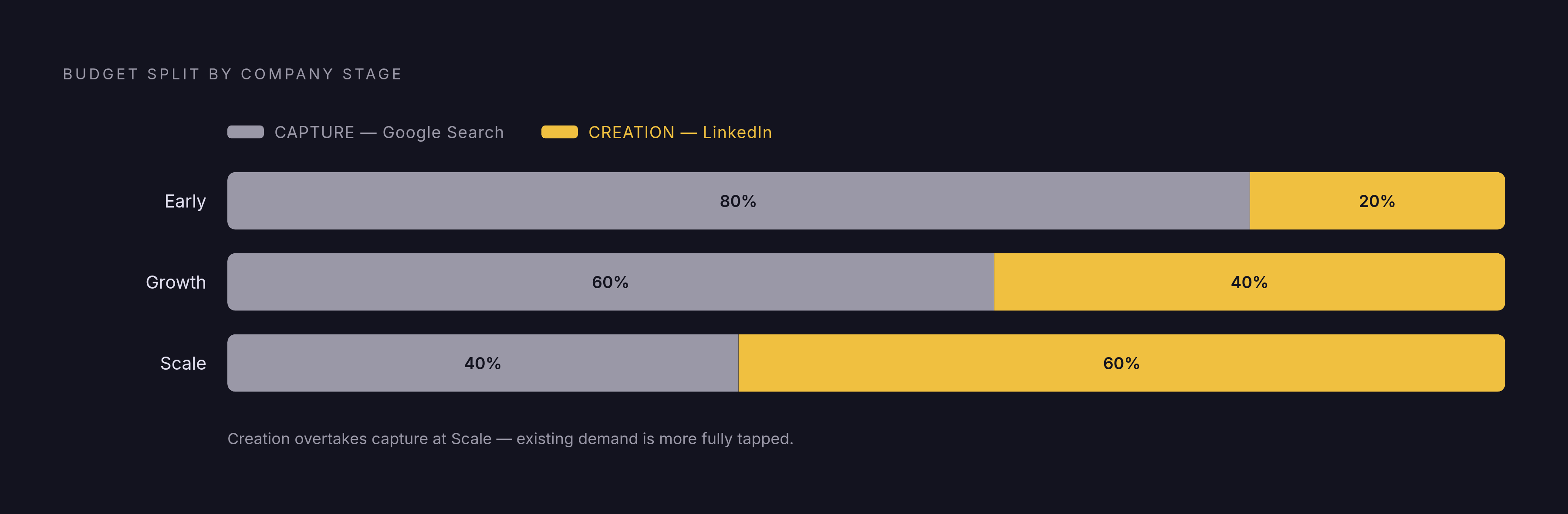
A rough budget framework can help here as a starting point for balancing demand capture against demand creation. Early-stage companies tend to run closer to 80% demand capture and 20% demand creation. Growth-stage companies shift toward 60% capture and 40% creation. Scale-stage companies move further still, toward 40% capture and 60% creation, because by that point existing demand in the market has already been more fully tapped.
Creative and landing pages as variables in the same system, not separate workstreams
Pipeline reporting can show exactly which campaigns are generating qualified opportunities, but it can't rescue a program where the ad creative attracts the wrong audience before the click, or the landing page loses that audience right after it. Measurement and execution have to be treated as parts of the same system, because a clean signal flowing into a broken landing page still produces a broken result.
Creative has become the primary lever for targeting outcomes in paid search, which makes it a problem when media buying and creative production sit in separate teams with their own reporting lines. Every day a failing asset sits unreplaced because feedback has to cross an organizational boundary is a day of wasted spend, and that lag compounds across the life of a campaign.
Landing pages follow a simple, binary rule: every ad drives to a dedicated page built around one clear call to action. Sending paid traffic to a general homepage instead drops conversion rates meaningfully, and there's no version of a generic homepage that outperforms a page built for the specific search that brought someone there.
This is where CRM-connected reporting earns its keep again. With pipeline stage data flowing back, a team can tell whether a weak campaign has a creative problem, meaning clicks are coming in but from the wrong audience, or a landing page problem, meaning clicks are strong but conversions aren't following. Without that data, both failures look identical on a standard CPL dashboard, and teams end up guessing at the fix.
A team's learning speed produces the real advantage. Running three clean experiments a quarter, each testing a genuinely different audience, channel, or offer, compounds faster over time than running many variants of the same underlying idea. Learning velocity, not raw CAC in any single month, is what separates accounts that keep improving from accounts that plateau.
How CRM-connected pipeline reporting changes team decisions
Everything in the sections above, the gclid capture, the extended attribution windows, the intent-based campaign structure, the creative and landing page discipline, exists to produce one thing: a reporting system that tells a team the truth about where revenue actually came from.
Once that system is in place, the questions a team asks in a weekly review change. Instead of asking whether cost per lead moved, you ask which campaign tier is producing the most pipeline value per dollar. Instead of celebrating a drop in CPL, you ask whether that drop came with a drop in close rate, since a cheaper lead that never converts was never actually cheap. You make decisions about cutting or scaling a campaign against cost per SQL and cost per opportunity, figures that connect directly to revenue, not against surface metrics that can look good while pipeline quietly dries up.
That shift changes who gets to participate in the decision, too. When marketing's numbers and sales' numbers come from the same underlying data, a conversation about whether paid search "works" stops being a dispute between two departments reading two different spreadsheets and becomes a shared read of the same pipeline, with the attribution window extended well beyond Google's 30-day default, which misses most B2B conversions.