Google Tag Manager Implementation for B2B Conversion Tracking
Set up conversion tracking to protect lead quality from algorithmic drift.

Google Tag Manager is a single snippet of code, installed once. After that, every other tracking tag, analytics, ad pixels, consent scripts, heatmap tools, gets managed from one place. Nobody has to ask an engineer to touch the site's source code every time marketing wants to track a new button.
The system runs on four parts:
- Container: the box that holds everything
- Tags: the actual tracking snippets (a GA4 pixel, a Google Ads tag, a LinkedIn pixel)
- Triggers: the rules that decide when a tag fires (page load, button click, form submit)
- Variables: the details that make triggers precise (which URL, which button, which form field)
Underneath all of it sits the data layer: a chunk of code that passes stable signals from the website into GTM. This matters on form-heavy B2B sites, where page elements change all the time. A trigger based on "click the third button on this page" breaks the moment someone redesigns the page. A trigger based on a data layer event doesn't care what the page looks like.
GTM also works as a hub. HubSpot, Salesforce, Google Ads, LinkedIn Ads, GA4, they can all pull from the same container instead of each needing its own separate code deployment. One line is worth drawing clearly here: GTM delivers data, GA4 and Google Ads receive and report on it. Mix those two jobs up and the result is duplicate tracking, or hours spent debugging the wrong tool.
Two more things worth knowing. GTM keeps a version history, so every published change is a rollback point, and changes get tested in preview mode before they go live. That matters when marketing and engineering are coordinating deploys. And access controls (who can publish versus who can only draft) cut down on undocumented changes. A broken conversion tag doesn't announce itself. It can misreport quietly for months before anyone checks the numbers closely enough to notice.
One naming quirk worth flagging: since 2022, "Google tag" refers to the unified tag tied to a GA4 Measurement ID or Google Ads ID, and it's a different thing from the GTM container itself. Mix those up and the risk is double-implementation, where the same tag fires from GTM and from hardcoded site code at the same time.
How GA4 event tracking in GTM differs from Universal Analytics and why the migration still trips up B2B teams
Universal Analytics used one tag type for basically everything. GA4 splits that into two: a Configuration tag (fires on every page, holds the Measurement ID) and separate Event tags for specific interactions. That split is more flexible, but it's also more places to get something wrong.
UA also locked event data into four fixed fields: Category, Action, Label, Value. GA4 throws that out in favor of custom parameters that can be named anything at all. More power, but also more responsibility. In B2B specifically, those event names need to match the field names already sitting in the CRM, or someone downstream spends hours reconciling "demo_request" in GA4 with "Demo Requested" in Salesforce.
GA4's DebugView lets a tag get checked in real time while GTM is in Preview mode, without publishing anything live. That's a real step up from how UA debugging used to work.
Here's the mistake that keeps showing up in B2B accounts: teams copied their old UA conversion events straight into GA4 without ever asking whether those were the right events to begin with. Under UA, a lot of teams tracked the thank-you page view as the conversion. That was already a weak signal, and dragging it into GA4 unchanged just carries the weakness forward. GA4 makes it possible to track the actual form submission event directly, separate from any page view at all, and that's the more accurate signal every time. Anyone still tracking thank-you page views as their primary conversion in 2025 is measuring the wrong thing on purpose.
One more wrinkle: GA4 renamed "conversions" to "key events" back in March 2024. Google Ads still calls them "conversions." Same concept, two names, and that mismatch causes real confusion when connecting the two platforms. Because so many teams rushed off Universal Analytics at its July 2023 shutdown, plenty of accounts are still running today with misconfigured parameters or missing conversion flags, quietly skewing bidding decisions right now.
Choosing which conversion events to track and why B2B requires more precision than B2C here
Not every conversion deserves the same weight. Split them into two buckets:
- Macro conversions: demo requests, contact-sales forms, trial signups. Direct pipeline signals.
- Micro conversions: whitepaper downloads, pricing page visits, webinar sign-ups. Real intent, useful for nurture campaigns, but not what Google Ads should be told to optimize toward.
Take something as simple as a "Request a Demo" button. Track the click separately from the form submission it's supposed to lead to. The click tells you about friction on the page: lots of clicks, few completed forms means something on that form is broken. The submission is the actual conversion. Only the submission should go to Google Ads as a conversion event. Sending the click instead is the single most common way teams accidentally tell an algorithm to chase button-pressers instead of buyers.
There's also a choice between triggering on the thank-you page versus triggering on the form submission event itself. Thank-you pages are easier to set up, but they break if someone reloads the page or shares the URL. A trigger tied to the actual submission event is the more reliable option, full stop, and reliability matters more in B2B, where every completed form gets scrutinized against a much smaller total volume than a typical B2C funnel.
Here's the trap worth naming directly: if the demo requests being tracked include a lot of low-quality leads, an algorithm handed that data goes and finds more of exactly that. The definition of the conversion event is the point where lead quality gets protected, or slowly destroyed, by an algorithm doing exactly what it was told to do.
The fix is boring but effective: use stable trigger criteria. A dedicated element ID (something like demo-btn) or a data layer event, not a trigger based on button text or CSS position that breaks the next time someone edits the page copy.
Once the right events are locked in, GTM variables can enrich them further: entry page, traffic source, content type. That's what turns raw conversion counts into channel-level analysis that connects specific paid campaigns to actual pipeline quality, not just volume.
Setting up Google Ads conversion tracking in GTM: the current method including the 2025 enhanced conversions change
Before touching anything in GTM, three things need to exist: the GTM container installed on the site, a conversion action created inside Google Ads (which generates a Conversion ID and Conversion Label), and a clearly defined trigger for the event being tracked.
Two tags do the actual work:
- Conversion Linker tag: needs to fire on every page. It saves click data in first-party cookies, which matters more every year as third-party cookies get phased out. Skip this tag and attribution starts breaking without warning.
- Google Ads Conversion Tracking tag: configured with the Conversion ID and Label, fires on the specific trigger (the form submission event, ideally, rather than the thank-you page).
There's also a choice between native Google Ads tags and importing conversions from GA4. Native tags send data straight to Google Ads in real time and tend to be more reliable for bidding, but each conversion action needs its own tag setup. Importing from GA4 gives access to cross-channel attribution models and reuses events already being tracked, but comes with a slight delay and needs extra setup for enhanced conversions. For B2B paid media, where bid strategy lives or dies on data quality, native tags are the safer bet, plainly. The convenience of importing from GA4 isn't worth the lag when a bidding algorithm is making decisions on a handful of high-value conversions a week.
Now the part that's tripped up a lot of accounts recently. As of 2025, the old method of turning on enhanced conversions with a simple checkbox inside the conversion tag no longer exists in GTM. Google now requires user-provided data (a hashed email or phone number from a form, for instance) to be set up through a separate "Google Ads User-provided Data Event" tag, or by manually adding user_data to the Event Parameters. This isn't just bureaucratic reshuffling. Splitting the two apart makes it clearer where that user data comes from, and lines up better with Consent Mode V2 and GDPR requirements. Anyone who set up enhanced conversions before the end of 2024 should go back and check the setup still works under the new method. Google has indicated it plans to unify enhanced conversions back into a single toggle starting April 2026, with existing accounts migrated automatically, but until that happens, the split setup is what's live.
Before publishing any of this, run it through GTM's Preview mode alongside GA4's DebugView or Google Ads' Tag Assistant. Confirm the tag fires on the right event, with the right parameters, before it goes anywhere near real traffic.
The stakes here aren't abstract. LähiTapiola, after setting up Google tags properly through tag management, saw a 37% jump in conversions and a 7% drop in cost per conversion. That's not a story about clever bidding strategy. That's tag infrastructure directly changing what data an algorithm had to work with.
Adding LinkedIn Insight Tag through GTM and why it matters specifically for B2B
The LinkedIn Insight Tag is the pixel behind LinkedIn's conversion tracking and audience building. It goes into GTM using a Partner ID, with setup options available through the Community Template Gallery.
Why does this matter more for B2B than almost anywhere else? Because LinkedIn carries something Google simply doesn't have: professional identity. Job title, seniority, company size, industry. That's the exact targeting data a B2B campaign needs, and no amount of search-based data from Google replicates it.
Think of the two platforms as playing different roles. LinkedIn tends to warm up an audience before they start actively searching for a solution. Google tends to catch people once they're already searching. Track both through the same GTM container, using the same data layer, and the same clean event definitions feed both platforms instead of requiring separate tracking logic for each.
LinkedIn conversion tracking also opens the door to retargeting based on actual site behavior: someone who visited the pricing page but never filled out a form, for instance. In a sales cycle that runs months, that's a genuinely valuable audience to keep in front of.
Same rules apply here as everywhere else: consent and the data layer discipline built for Google tags need to apply to the LinkedIn pixel too. Fire it outside proper consent conditions and that's a compliance problem waiting to surface. And the payoff for doing this right is real. Matched audiences and lookalikes built from LinkedIn's data are only as good as the site events feeding them, and those events are only clean if they were defined properly in GTM in the first place.
Why client-side tracking alone fails for 60-to-180-day B2B sales cycles and what server-side GTM addresses
Ad platforms track conversions by matching a click to a later conversion event, in the same browser. That's the whole model. Now stretch the sales cycle out to four or five months. By the time a deal closes, the click cookie has expired, the buyer switched laptops, or the actual conversion (a signed contract) happened entirely offline, over email or a phone call. The tracking model wasn't built for that gap.
Ad blockers and browser limits like Apple's ITP make this worse. Cookies get capped at seven days on some browsers, and cross-site tracking gets blocked outright. B2B audiences skew toward people using managed corporate devices with IT departments that lock things down tighter than the average consumer browser. Client-side pixels still fire, technically, but they can't track effectively across that gap for a meaningful share of the audience.
Server-side GTM moves the tracking layer off the browser entirely and onto a server the company controls (hosted through something like Stape.io or Google Cloud Platform). The browser sends events to that server, and the server forwards them on to Google, LinkedIn, and anywhere else, with far less signal loss along the way.
That recovers a real chunk of conversions that client-side tracking simply misses because of blockers and ITP limits. For B2B budgets, where a single conversion can represent a deal worth a lot of money, that recovered signal isn't a rounding error. It's the difference between an algorithm learning from half the picture or most of it. Anyone still running client-side-only tracking on a six-figure ad budget is training their bidding algorithm on a coin flip.
The real payoff, though, is what server-side tracking makes possible with CRM data. A lead that fills out a form in month one and becomes a sales-qualified opportunity in month three can have that milestone sent back to Google Ads and LinkedIn as an offline conversion event. HubSpot, Salesforce, and Zoho can all be set up to trigger these uploads automatically. That closes the loop between what sales actually confirms as real pipeline and what the ad platform believes generated it.
There's a privacy upside too. Server-side tracking processes data before it ever reaches a third party, which means more control over exactly what gets sent where. That lines up cleanly with Consent Mode V2 and gives B2B companies operating under GDPR a much more defensible setup than firing pixels straight from the browser.
Feeding CRM pipeline data back into ad platforms to make conversion tracking meaningful beyond the form fill
Here's the structural gap underneath everything else in this piece. GTM and ad platform tags see what happens on the website. The CRM holds the truth about what that website interaction actually became: a qualified opportunity, a closed deal, or a lead that went nowhere. Those two systems don't talk to each other by default.
Offline conversion imports are the bridge. Both Google Ads and LinkedIn Ads accept offline conversion data, matched against a GCLID (Google's click ID) or LinkedIn's equivalent click ID, captured the moment someone filled out a form.
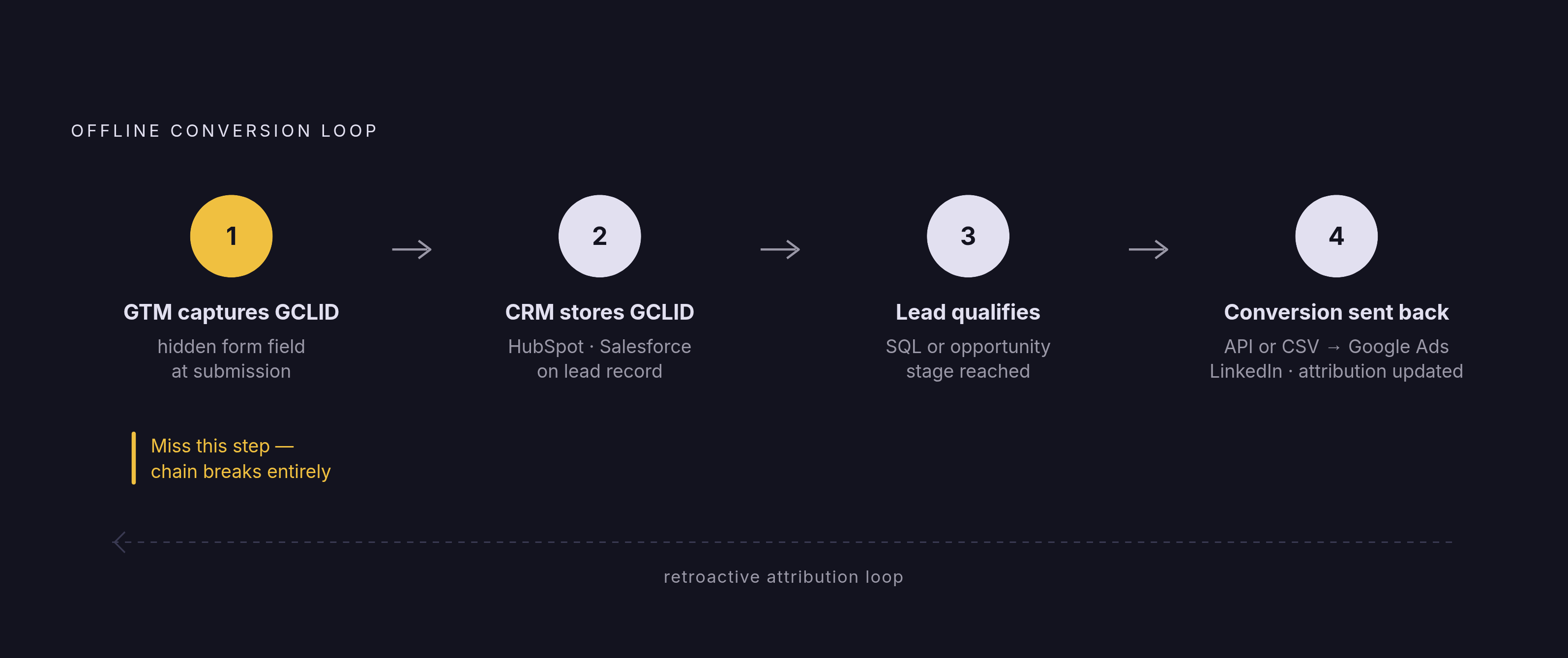
That click ID has to be captured right then, at submission, and stored on the CRM record. A hidden field set up in GTM handles this. Miss that step and the link back to the ad click that started it all is gone for good. No amount of CRM reporting fixes a GCLID that was never captured in the first place.
Get it right, though, and something changes structurally. Google's Smart Bidding and LinkedIn's optimization tools can now train on opportunity creation or deal stage movement instead of raw form fills. That's a fundamentally different target for the algorithm to chase, and it lines up with what the business actually cares about.
Worth remembering why this matters so much: MarketJoy's 2025 B2B funnel benchmarks put visitor-to-lead, MQL-to-SQL, and opportunity-to-close rates all well below the point where raw form fill volume tells you anything reliable about revenue. A pile of form fills that never turns into revenue is not a signal worth optimizing toward, no matter how good it looks on a dashboard.
The full sequence looks like this: GTM captures the GCLID in a hidden form field, the CRM stores it on the lead record, the lead advances to SQL or opportunity, and the CRM (HubSpot, Salesforce, whichever) sends that offline conversion event back to Google Ads and LinkedIn through an API or CSV upload. From there, the ad platforms retroactively update their conversion attribution.
That's the infrastructure that finally lets someone answer "which campaigns are generating real pipeline" with actual data, instead of a guess dressed up as an answer.
Consent Mode V2, GDPR, and how B2B tracking must account for consent without destroying signal quality
Consent Mode V2 answers a real tension: how do you respect a user's choice not to be tracked while still keeping enough signal to make bidding decisions with? The framework lets GTM tags fire in a limited mode when someone hasn't consented, sending limited signals instead of nothing at all. It's a compromise, and a reasonable one.
GTM sits right at the center of how this actually works. A Consent Management Platform collects the user's choice and GTM uses it to decide which tags fire and in what mode. That's the exact point where consent and tracking either work together or quietly conflict.
The 2025 change to enhanced conversions (that new "Google Ads User-provided Data Event" tag) was built with this specifically in mind. Separating the collection of consent-gated user data from the conversion signal itself makes the whole system easier to audit and more consistent with privacy requirements.
For B2B companies selling into the EU, or into any regulated industry, GDPR compliance isn't a nice-to-have. A misconfigured consent setup is a real liability, not a hypothetical one. But the flip side is just as true, and teams miss this constantly: blocking every tag out of caution destroys the signal quality that makes the rest of this whole system worth building. Neither extreme works. The goal is a GTM setup built carefully enough that compliance and good data survive in the same room.
Sources
- GA4 & Google Tag Manager for B2B Marketing | Walker Sands
- Google Ads Tag Manager: Streamlining Your Ad Tracking
- Google Ads Conversion Tracking with Google Tag Manager
- Advanced conversion tracking via GTM: 2025 new tag - Loïc Chossiere
- GA4 for B2B: How to track events and conversions
- analyticsmania.com
- analyticsmania.com
- stape.io