Performance Max for B2B Lead Generation
Setup determines whether Performance Max builds pipeline or wastes budget on unqualified leads.

Performance Max can build real B2B pipeline. It can also burn through budget chasing form fills from students and job hunters who will never buy anything. Which outcome you get depends almost entirely on setup, not luck.
Here's the thing about PMax: you give it a goal, a budget, and a pile of creative assets, and Google's AI takes it from there. It decides who sees your ads, where they show up (Search, YouTube, Display, Gmail, Maps, Discover, all of it), and how the creative gets put together. That's the pitch, anyway. And it works great when the thing you're optimizing for is a purchase. Someone adds a product to a cart, checks out, done. Volume and value move together.
B2B doesn't work that way. A form fill isn't a lead. A lead isn't a qualified opportunity. And Google's algorithm has no way of knowing the difference unless you tell it. Left alone, PMax will chase conversion count, and in B2B that usually means it finds you the easiest conversions available: job seekers, students, people at companies with ten employees who were never going to buy your high-ticket software. Marketing dashboards start showing more leads. Sales pipeline stays flat. And now CFOs are asking why in board meetings, not just marketing standups.
None of this means skip PMax. It means PMax needs work before it earns a seat at the table.
The data threshold PMax actually needs before it can optimize for quality
PMax runs on machine learning, and machine learning needs data to learn from. Below a certain volume, the algorithm isn't optimizing. It's guessing.
The rough floor: about 30 or more conversions a month, and a substantial monthly budget. Fall short on either number and Search campaigns will beat PMax pretty much every time.
So if you're early stage, or your conversion history is thin, Search is the safer bet for now. Test results back this up: PMax delivered lower cost per acquisition and better return on ad spend for 58% of businesses tested. That's the majority, sure, but it skews toward e-commerce and local services. The other 42%, the ones where Search won, skew toward B2B, professional services, and complex products. Sound familiar?
The honest read: PMax isn't an automatic upgrade from Search for B2B companies. It's a conditional one. It pays off once the data foundation is there, not before. So before you touch it, go check your current monthly conversions. Under 30? Fix that first. Everything else in this article assumes you've cleared that bar.
Offline conversion tracking: what it is and why nothing else works without it
Here's the core problem: Google Ads can see a form fill. It cannot see what happens after. Did that lead get qualified by sales? Did it turn into an opportunity? Or did it go nowhere? Google has no idea, unless you tell it.
Offline conversion tracking closes that gap. It sends outcome data from your CRM back into Google Ads, so PMax can learn which form fills actually turned into pipeline, not just which ones happened.
The workflow looks like this:
- Capture the GCLID. Add a hidden field to your lead forms that stores Google's click identifier the moment someone submits.
- Qualify in the CRM. When a lead becomes sales-qualified, or moves to an opportunity stage, log that event against the GCLID.
- Upload it back to Google Ads. That SQL or opportunity event becomes the conversion action PMax actually optimizes toward, instead of the raw form fill.
Once that's in place, the algorithm stops treating every form fill as equally good. It starts learning the traits of the ones that actually mattered, the audience, the search terms, the time of day, the device.
One catch: give it time. The conversion action needs at least 30 days of data, and enough volume, before PMax can use it well. That's why offline conversion tracking needs to go in before you launch PMax, not after you notice the lead quality is bad.
Skip this step and everything else in this article is aimed at the wrong target. Set it up, and the system gets smarter over time instead of repeating the same volume-chasing behavior month after month.
Negative keywords and search themes: how to constrain where PMax actually shows up
PMax's reach across channels is great for e-commerce and a real problem for B2B. Display and YouTube inventory sits at the top of the funnel, and it routinely puts your ads in front of people with zero purchase authority and zero intent.
For a while, this was a dealbreaker. Negative keyword control inside PMax used to be limited, which is a big part of why a lot of B2B marketers steered clear of it. That's changed. Google expanded campaign-level negative keyword capacity in 2025, and it's now a real lever you can pull.
What that looks like in practice:
- Build your exclusion list before launch. Block generic informational searches ("what is," "definition of," "free"), job-seeker terms ("careers," "salary," "jobs"), and competitor brand names you don't want to bid against.
- Apply negative keyword lists at the campaign level. This filters out junk queries across Search and Shopping inventory inside PMax.
- Check the search terms report weekly, especially early on. PMax will surface queries you never would have guessed. Catch them early, before wasted spend piles up.
Search themes are the other lever. Google increased the number of search themes allowed per asset group in 2025, giving advertisers a real way to point PMax toward relevant intent without hard keyword targeting.
Use search themes for the problem-aware and solution-aware phrases your buyers actually type, not broad category terms or brand names that just attract noise. Clean negative lists plus well-chosen search themes narrow where PMax shows up, without giving up the automation that makes it useful in the first place.
Asset group architecture: organizing creative to give the algorithm useful signal
PMax builds ads on the fly from whatever assets you give it. Dump every headline, image, and description into one asset group, and the algorithm has no way to match the right message to the right audience. It just guesses.
For B2B, structure asset groups around audience and funnel stage:
- Segment by persona or industry vertical when the messaging genuinely differs. A security buyer and a finance buyer have different problems, even if they end up buying the same product.
- Segment by funnel stage if you're running awareness and conversion goals in the same campaign. Otherwise your top-of-funnel creative will drown out the assets meant to drive conversions.
- Each asset group should read like a coherent pitch to one audience, not a grab bag of everything you've ever written.
On the creative itself: headlines should speak to a specific pain point, not list product features. Descriptions should carry proof, a result, a customer type, a use case, not marketing language that could belong to any company in your category.
Google also rolled out PMax A/B creative testing in beta in 2025. Use it. For the first time, you can actually see which assets are driving conversions versus which ones are just racking up impressions, and cut the ones that aren't earning their spot.
Landing pages matter here too. The offer on the page needs to match the creative in the asset group. If they don't line up, PMax generates clicks the page then fails to convert, and the algorithm reads that as a targeting problem, not a landing page problem, which sends it chasing the wrong fix.
Last piece: attach audience signals, customer match lists, CRM uploads, lookalikes built from existing SQLs, at the asset group level. Not as hard targeting, but as a starting point that tells PMax who to go find.
Cannibalization and coexistence: running PMax alongside Search campaigns without losing control
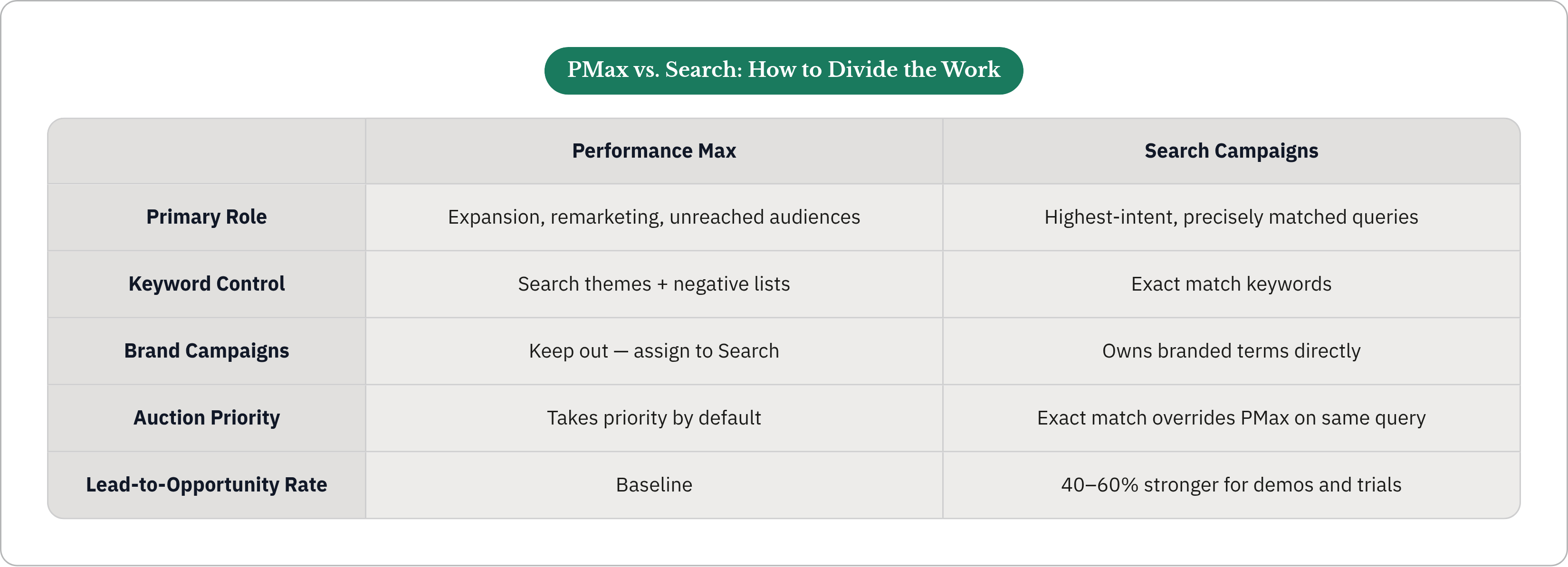
Here's something a lot of people don't realize until it costs them: PMax takes priority over Search campaigns when both could serve for the same query. That's not a setting. That's just how the auction works.
The practical effect: run PMax broadly enough, and it can quietly suppress your branded and high-intent exact match Search campaigns, the ones with the longest, most reliable conversion history you have.
How to protect those campaigns:
- Use exact match keywords in Search for your highest-value terms. Google still honors exact match priority over PMax's broader query matching on the same query.
- Keep branded campaigns in Search, not PMax. Brand searches convert differently and deserve to stay under direct control.
- Watch Search Impression Share and query overlap between PMax and Search in the first 60 days, so you can actually see where PMax is stepping in.
The structure that works for most B2B accounts: Search owns the highest-intent, most precisely matched queries. PMax handles the rest, expansion, remarketing, audiences Search can't reach on its own.
Worth protecting, because Search campaigns consistently produce higher lead-to-opportunity rates for demos and trials, somewhere in the 40 to 60% range better than PMax. That's not a gap you want to hand over to PMax's default priority just because it's convenient.
The goal isn't picking a winner between the two. It's dividing the work so each one does the job it's actually good at.
Where PMax fits in the broader Google + LinkedIn system for B2B pipeline
B2B buying isn't a single click and a checkout. Deals involve multiple people and long research cycles. No single campaign, no single channel, covers that whole arc.
That's where LinkedIn fits into the picture alongside Google:
- LinkedIn builds awareness among the people who make up the buying committee before they're actively searching for anything. It works on demand that doesn't exist yet.
- Google, through Search and PMax, captures demand once it does exist, once someone starts searching.
- Run both together and each channel covers a part of the buying cycle the other cannot reach on its own.
Inside Google's own ecosystem, Demand Gen and PMax split the work too:
- Demand Gen, spanning YouTube, Shorts, Discover, and Gmail, handles cold prospecting with real audience control. It reaches people who match your ideal customer profile before they're in-market.
- PMax handles the conversion side, working off remarketing lists and first-party signals from people who've already shown buying behavior.
- Skip the audience exclusions between the two, and PMax ends up bidding against the exact accounts Demand Gen just paid to introduce. That's money working against itself.
LinkedIn's own 2025 B2B Benchmark Report names it the top channel for qualified leads among 89% of B2B marketers surveyed. Its job in this system is to warm up the audience that PMax then converts more efficiently downstream.
So the real question isn't PMax versus LinkedIn. It's how you wire the handoff so each one does the part it's actually built for.
What PMax's 2025 reporting improvements actually let you diagnose now
Through 2024, PMax had a real, legitimate problem: the reporting was a black box. Performance data came aggregated, so figuring out which channel, audience, or asset was actually driving results was close to impossible.
That changed in 2025, with a few upgrades worth knowing about:
- Channel-level breakdown. You can now see impressions, clicks, and conversions split out by channel, Search versus Display versus YouTube. For the first time, you can tell whether your results are coming from high-intent search traffic or cheap display inventory that happens to convert on volume.
- Asset-level performance. Creative reporting now rates individual headlines, images, and descriptions as low, good, or best. Use it to cut what's underperforming and replace it on a regular cycle.
- Better search terms visibility. The search terms report is easier to get to, which supports the negative keyword work covered earlier.
What to do with all this: if most conversions trace back to Display or YouTube, tighten your channel exclusions and reinforce the conversion signal you're feeding PMax. If Search is driving the bulk of it, PMax is basically acting like a smart Search campaign, which means your setup is doing its job.
The PMax A/B testing beta from 2025 pushes this further. It's the first time you can actually run a controlled test inside PMax, isolating which creative change moves conversion rate rather than just which asset happens to get more impressions.
One caveat: none of this reporting matters unless you connect it back to CRM outcomes. A creative that generates a flood of form fills but zero SQLs isn't an asset. It's a liability you're about to scale by accident.
The judgment layer PMax's automation cannot replace
Everything covered here, offline conversion tracking, negative keywords, asset group structure, protecting Search from cannibalization, channel exclusions between PMax and Demand Gen, isn't a one-time setup. It needs regular attention as the account collects more data and the market shifts underneath it.
PMax's automation is genuinely good at execution: bidding, assembling creative, distributing across channels, processing signals in real time. No human team moves at that speed or covers that much ground.
What it can't do:
- Tell the difference between a conversion signal problem, a creative problem, a landing page problem, and a targeting problem when performance dips. That takes judgment and context, not just data.
- Notice the moment it's started eating into a Search campaign's best-performing terms and step in before budget shifts the wrong way.
- Know whether the leads it's generating are actually moving through the CRM. It sees the upload. It doesn't sit in on the sales calls.
- Adjust when your product positioning changes, a competitor shows up, or your sales team notices a pattern in lead quality that hasn't shown up in the platform data yet.
Here's the accountability question worth sitting with: paid media running without someone clearly responsible for these calls will drift right back to chasing volume, the exact behavior all this configuration was built to avoid. The setup doesn't hold on its own. It needs someone watching it.
That's the real gap between running PMax and running it well. One is a campaign type. The other is an ongoing job, automation handling execution, a person handling the decisions the business is actually on the hook for. Whether that person sits in-house, at an agency, or somewhere in between, like Thunder, where AI agents run Google and LinkedIn Ads end to end for B2B companies with a human expert accountable for outcomes, the question stays the same: who owns this, and are they being measured on pipeline and revenue, not just cost per lead?