Performance Max for B2B Lead Generation Accounts
PMax works only when it optimizes toward qualified pipeline, not form fills.

Let me start with a confession: I have sat in more "the leads are up but pipeline is flat" meetings than I care to count. And almost every time, the root cause was the same. Not the product. Not the sales team. Not the market. It was a campaign type running on autopilot, optimizing hard toward the wrong thing.
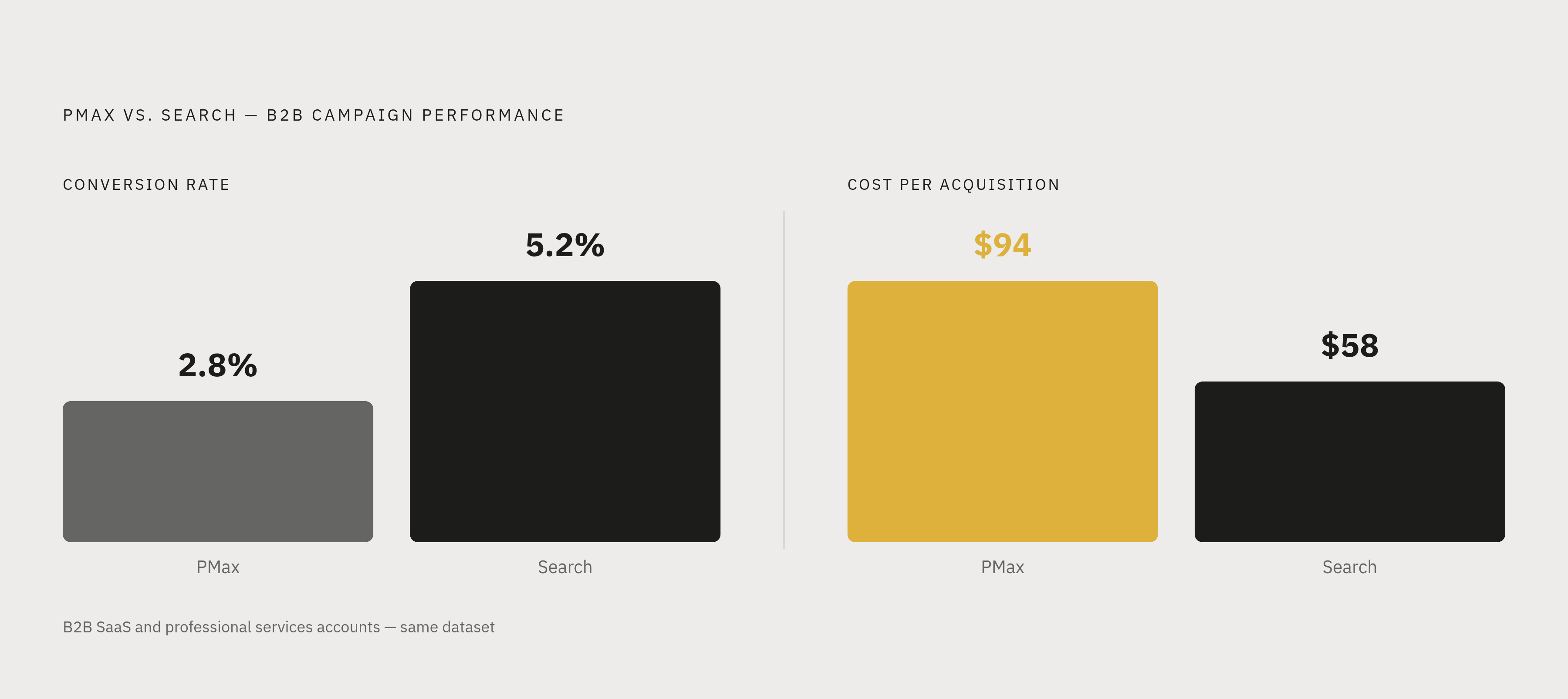
Performance Max shows high conversion rates in B2B lead gen accounts because it is optimizing toward form fills, and it is genuinely excellent at finding people who submit forms. The problem is that form submitters and qualified pipeline opportunities are two different populations, and PMax has no way to know the difference unless you tell it. Without offline conversion tracking (OCT) feeding pipeline events back to Google Ads with the original GCLID attached, the system keeps rewarding the signal it was given: cheap, high-volume form fills that sales never touches. Across the 143 B2B PMax accounts in the dataset referenced here, service businesses with complex sales cycles averaged a 2.8% conversion rate and $94 CPA, while equivalent accounts running standard Search campaigns averaged a 5.2% conversion rate and a $58 CPA, precisely because the optimization target was better aligned to actual buyer intent.
That campaign type was Performance Max.
That is not a knock on PMax. It is impressive technology. But impressive technology pointed at the wrong target just fails faster and more efficiently. In B2B lead generation, where a form fill and a qualified pipeline opportunity are two completely different things, PMax's default behavior is almost perfectly designed to look great and deliver nothing useful.
So let's talk about what's actually happening inside these accounts, why the default setup breaks down, and what the specific control levers are that make PMax work in a B2B context.
What the performance data actually shows about PMax in B2B accounts
Here is a stat that sounds like good news for PMax: across 247 accounts, PMax averaged a 4.7% conversion rate compared to 3.9% for Search campaigns. Headline looks favorable, right?
Not so fast.
Break that aggregate down by industry and the story flips. E-commerce drove the positive result. B2B companies in that same dataset actually saw Search campaigns convert 28% better than PMax. And the worst cohort. service businesses with complex sales cycles and consultative selling. averaged a 2.8% conversion rate and $94 CPA across the 143 PMax accounts tested. For context, B2B SaaS and professional services accounts running standard Search campaigns, managed by experienced specialists, averaged a 5.2% conversion rate and a $58 CPA.
That gap is not a PMax problem. It is a signal quality problem.
Why does e-commerce work so well? Because a purchase is a purchase. The conversion event is clean, final, and directly tied to revenue. PMax knows exactly what it's trying to find more of.
Now ask yourself: what does a B2B form fill represent? Maybe a real buyer. Maybe a student doing research. Maybe a competitor poking around. Maybe a consultant writing a think piece. The form fill is not the pipeline opportunity. It's just the first step toward one. And if you tell PMax to optimize for form fills, it will find you form fills. Lots of them. Cheap ones. From everyone.
There is also a data threshold to consider here. PMax's machine learning requires a meaningful volume of monthly conversions to stabilize and optimize effectively. Accounts running low conversion volumes are essentially asking the system to make high-confidence decisions on thin data. It underperforms badly in that condition. And it needs real budget for the model to learn.
The implication is straightforward. PMax's output is only as good as the inputs you give it. The rest of this article is about what those inputs are and how to configure them deliberately.
Why does Performance Max show high conversion rates in B2B accounts but pipeline never improves?
Most B2B PMax accounts are optimizing toward form fills or page visits by default. Both are weak proxies for pipeline. This is not a controversial opinion. It is just a description of how the optimization logic works.
Here is the mechanism. Whatever conversion action you feed PMax, the system finds more of that thing. It is very good at this. If you feed it a form fill signal, it learns what kind of users submit forms and finds more of them. The problem is that "user who submits a form" and "user who becomes a qualified pipeline opportunity" are two very different user populations. PMax will not know that unless you tell it.
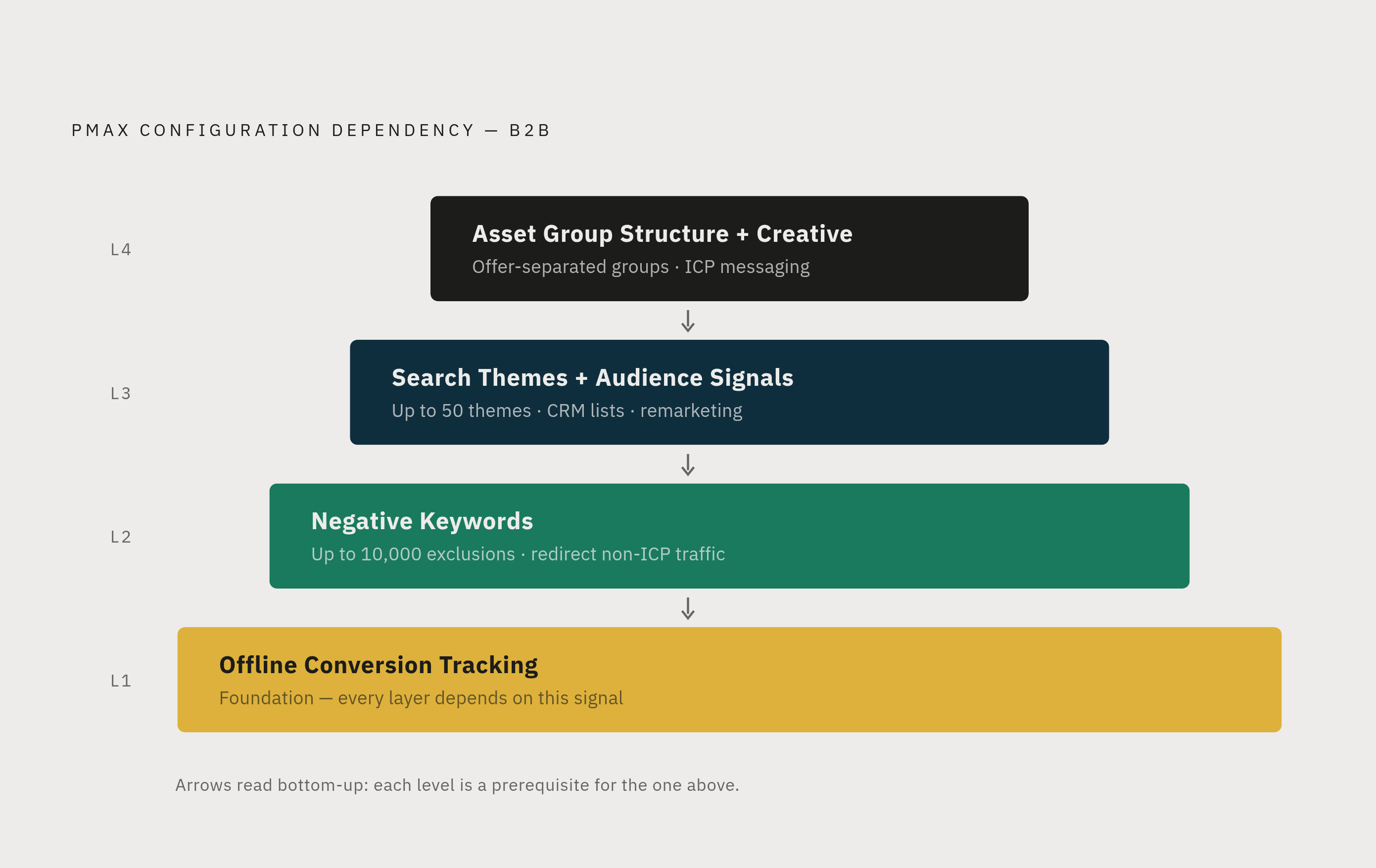
Offline conversion tracking (OCT) is how you tell it.
The setup looks like this:
- Capture the Google Click ID (GCLID) in a hidden field on every lead form at submission
- When a lead progresses in your CRM, whether that means becoming a sales-qualified lead, entering a deal stage, or closing as a customer, you export that event back to Google Ads with the original GCLID attached
- PMax sees which form fills actually turned into pipeline, and re-orients toward finding more users who look like those people
That is not a small change. That is a fundamentally different optimization target.
Pair OCT with CRM audience uploads and you compound the signal. Uploading closed-won customers, current SQLs, and high-value accounts as first-party data gives PMax a profile of what your real buyers look like. The closer the audience list is to the point of actual revenue, the stronger the signal. A list of closed-won customers beats a list of site visitors by a wide margin.
But here is what is worth sitting with. Without OCT, every other control lever in this article is just working around a broken input. Negative keywords help. Search themes help. Audience signals help. None of them compensate for an optimization target that rewards volume over quality. OCT is the prerequisite. Everything else builds on it.
Negative keywords: the most direct editorial control over where PMax shows up
For a long time, "PMax gives you no keyword control" was a legitimate and frustrating criticism. In B2B accounts especially, the inability to exclude junk traffic at the keyword level was a real problem.
Google updated this in 2025. Advertisers can now add thousands of campaign-level negative keywords directly within PMax. That is a lot of editorial control, and most B2B accounts are not using it aggressively enough.
What should B2B accounts exclude immediately? A few obvious categories:
- Consumer-intent queries. Job seekers, students, researchers, journalists. Anyone searching for information rather than a solution.
- Informational modifiers. "What is," "how does," "define," "examples of." These are research-stage queries. If your budget is limited, these are expensive ways to educate people who aren't buying yet.
- Geographic or industry terms outside your ICP. If you only serve mid-market companies in North America, you have no reason to appear in searches attached to markets you cannot sell into.
- Competitor brand variations with the wrong intent. Searchers comparing you to a competitor is one thing. Searchers trying to log into a competitor's platform are a different population entirely.
How do you build the list? Pull the search terms report. Google introduced a channel performance report in 2025 that surfaces more placement and query detail than was previously available. Look for patterns in non-converting queries, or queries that convert at a high volume but rarely show up in your SQL data. Those are your starting points.
One thing worth being clear about. Negative keywords are not suppression. They are redirection. You are telling PMax where not to look, so it focuses its attention on traffic that is more likely to match your ICP.
Also worth noting: add negatives at the campaign level for PMax, not the account level. Account-level negatives apply across all campaigns, including your Search campaigns. Keep your controls specific to where the problem exists.
Search themes: how to steer PMax toward the right queries without keyword lists
PMax does not run on keywords the way standard Search campaigns do. It uses search themes instead. Think of search themes as directional cues you give the AI. You're not saying "only show for this exact phrase." You're saying "this is the territory you should be exploring."
In 2025, Google expanded the search theme limit from 25 to 50 per asset group. For B2B accounts with multiple product lines or buyer personas, that expansion actually matters.
How do you use the extra capacity well? A few principles:
Map themes to asset groups by offer type, not just audience. A demo request asset group should have different themes than a gated content download asset group. The intent behind each conversion action is different, and the themes should reflect that.
Use the language of a qualified buyer, not your product team. There is a real difference between how your engineers describe your product and how a VP of Operations describes the problem they need to solve. The second version is what your themes should reflect.
Layer across funnel stages. Problem-aware queries, solution-aware queries, and vendor-comparison queries all represent different buyers at different points. Within your 50-theme limit, you can cover all three layers for a given asset group.
Search themes work alongside audience signals. They are not substitutes for each other. When your themes and your audience inputs are consistent, they reinforce the same picture of who you want to reach. When they're misaligned, you're sending the system mixed signals.
Review theme performance in the channel performance report. Some themes will drive conversions. Others will drive volume with no downstream pipeline value. That difference matters, and it's worth the time to find it.
Audience signals: giving PMax a head start on who actually converts
Here is something worth understanding about how audience signals work in PMax. They are not targeting constraints. PMax will go beyond them. It will find users who don't match your audience signals if it thinks they'll convert.
What audience signals actually do is accelerate the learning phase. They give the system a starting point that's grounded in your actual customer data rather than Google's default assumptions about your category.
For B2B accounts, the strongest signals to provide:
- CRM lists. Closed-won customers, current SQLs, churned accounts (as exclusions). These are the closest approximation to "person who became revenue."
- Remarketing lists, segmented by quality. All remarketing traffic is not equal. A list of people who attended a product demo is a different signal than a list of people who visited your homepage once.
- Custom intent audiences built from URLs. Your ICP is browsing somewhere. Competitor sites, industry publications, relevant trade events. Build audiences from those URLs and give PMax a map of where your buyers spend their time.
- In-market segments. In-market segments vary considerably in quality. Look for the ones that most closely match your buyer's active research behavior, not just the broadest category.
The machine learning dynamic here is worth thinking about. Better audience inputs at launch mean the system reaches quality traffic earlier, before it wastes budget in the wrong direction. That matters especially when your account is close to the minimum conversion threshold where PMax's model starts to struggle.
One maintenance note: refresh these lists quarterly. CRM data goes stale. Buying cycles shift. An audience list built on last year's customers may not reflect this year's ICP evolution.
And the caveat that keeps coming up. Audience signals cannot fix a weak conversion signal. If your OCT is misconfigured, great audience inputs still point PMax toward a bad optimization target. The two must work together.
Asset group structure and creative inputs that affect lead quality, not just click rate
Asset groups are the structural unit inside PMax where you organize creative by offer, audience, or funnel stage. They are often treated as a cosmetic organizational tool. They are not.
In B2B accounts, the structure of your asset groups directly affects the quality of the conversion signal your campaign generates. Here is why.
Separate asset groups by offer type. A demo request, a gated content download, a free trial, and an event registration all represent different intent levels. Group them together and you are averaging across four very different buyer signals. Separate them and you can attach different conversion actions to each, target each with relevant creative, and read the performance data clearly.
Use creative to self-select for ICP visitors. This is one of the more underappreciated levers in B2B PMax. Messaging that speaks to specific business outcomes, role-specific pain points, or company size signals naturally attracts people who fit the profile and deters people who don't. A high CTR from unqualified traffic is a liability. It actively makes your optimization signal noisier.
Generic creative maximizes impressions. Specific creative maximizes qualification. Those are different goals.
Google launched PMax creative A/B testing in beta in 2025. You can now run test-and-control structures to see which headlines, descriptions, and images actually drive conversions, not just clicks or impressions. For B2B, the most useful tests are probably specificity versus generality in headlines, and benefit-led versus problem-led framing. Measure by conversion quality, not click volume.
One more thing. The landing page has to match the asset group's creative. If your ad speaks to a specific pain point and your landing page gives a generic product overview, you will inflate bounce rate and degrade the conversion data PMax learns from. The qualification signal has to be consistent from ad to landing page.
Where PMax fits in a B2B account structure alongside Search and Demand Gen
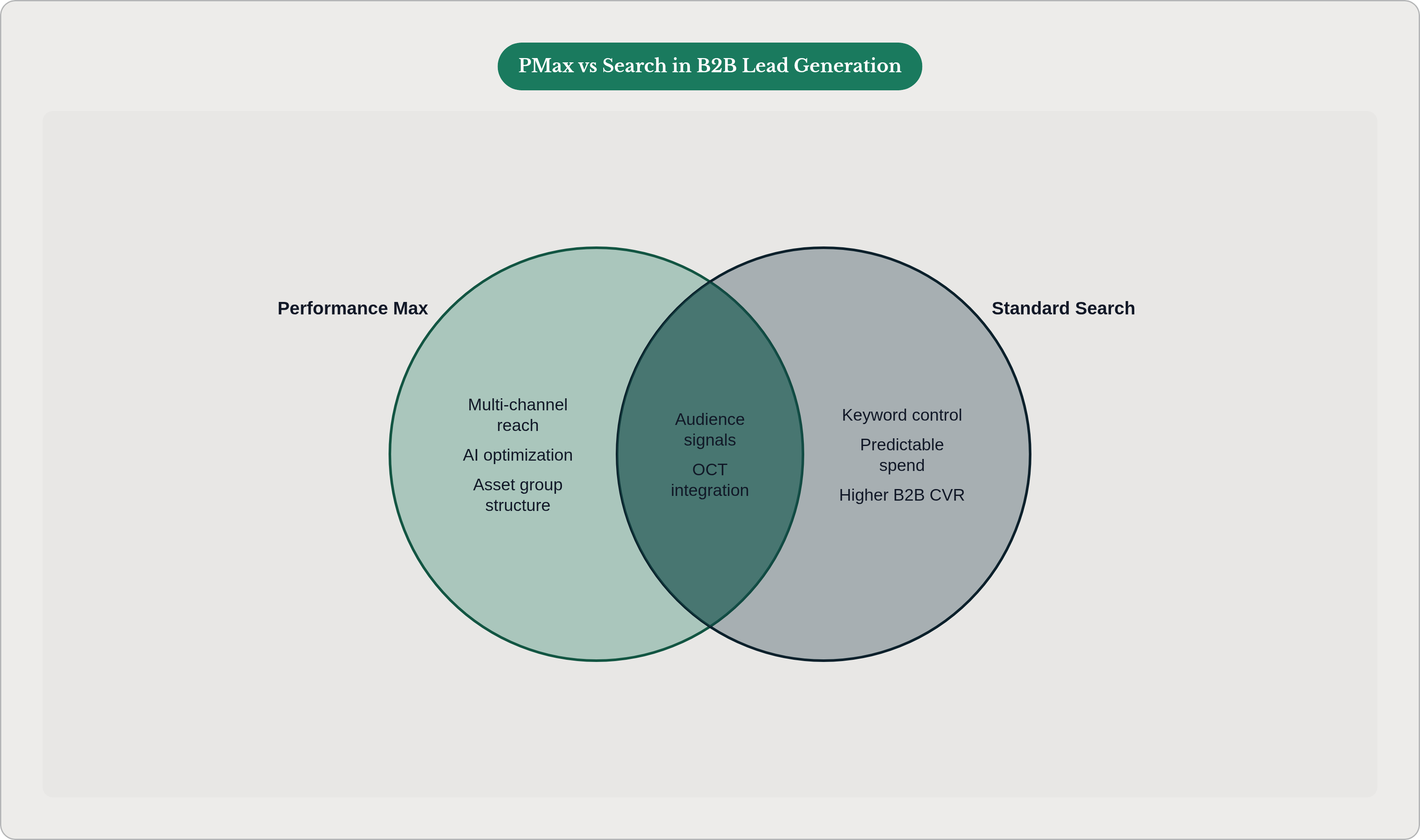
The big-picture question in most B2B accounts isn't "should we use PMax?" It's "where does PMax belong relative to everything else?"
Here is how to think about it.
Standard Search captures high-intent, keyword-specific demand. It's predictable, controllable, and per the data mentioned earlier, it consistently outperforms PMax in B2B SaaS and professional services contexts. Search should hold the majority of your paid search budget in most B2B accounts.
Demand Gen runs prospecting against cold audiences across YouTube, Discover, and Gmail. Its job is to introduce your brand to people who don't know you yet. That's a top-of-funnel function, and PMax should not be asked to do it.
PMax works best in a B2B context when it's doing conversion capture against remarketing lists and high-intent first-party signals. In other words, audiences that have already been warmed by Search or Demand Gen exposure.
That implies a sequencing logic. Search introduces and captures. Demand Gen warms. PMax converts. When you ask PMax to do all three jobs at once with a cold account and weak signals, you get the performance numbers from the opening section of this article.
There is also an overlap problem worth naming explicitly. Without audience exclusions, PMax and Demand Gen are often bidding against the same user at the same time. PMax claims the conversion, Demand Gen claims the introduction, and neither your attribution nor your incrementality numbers mean anything. The practical fix is to exclude your Demand Gen audiences from PMax, and to exclude current customers and active pipeline from both prospecting campaign types.
The channel performance report is your diagnostic tool here. It surfaces where spend is overlapping and where one campaign type may be cannibalizing credit from another. The PMax A/B testing feature, now available in beta at the campaign level, lets you actually measure whether adding PMax to a Search-led account drives incremental pipeline or just redistributes attribution.
Reporting on PMax in B2B accounts: the metrics that distinguish pipeline signal from noise
Cost-per-lead and conversion volume are the wrong primary metrics for a B2B PMax account. They reward exactly the failure mode this article has been describing. High volume, low quality, flat pipeline, uncomfortable meeting with the CFO.
Here is a better reporting hierarchy.
Primary: cost-per-SQL and cost-per-pipeline-opportunity attributed to PMax. This requires OCT to be operational. Without OCT, there is no meaningful primary metric. Full stop.
Secondary: MQL-to-SQL conversion rate by campaign. This is your early warning system. If conversion volume is steady but the MQL-to-SQL rate is declining, the campaign is drifting toward lower-quality leads. Catch it early.
Tertiary: channel-level breakdown from the channel performance report. PMax campaigns that look healthy in aggregate often have one or two placements doing the heavy lifting in the wrong direction. Display and Discover are frequent culprits. High conversion volume, no downstream pipeline contribution. These are candidates for audience exclusions or asset group restructuring.
One caution about timing. PMax needs sufficient conversion volume to stabilize its model. Evaluating performance during the learning period is not the same as evaluating it after. Early data is directional. It tells you if something is badly wrong. It does not give you a reliable read on what the campaign will look like once the model has had time to learn.
The final thing worth naming is the feedback loop that makes a properly configured PMax account compound over time. OCT data from this month's pipeline outcomes updates next month's optimization signal. A well-built PMax account should improve with each campaign cycle without requiring constant manual intervention to stay on track. That is the promise of the technology.
Whether you get that version or the other version, the one that runs efficiently toward the wrong goal, depends entirely on the inputs.