Controlling Search Term Visibility in Performance Max
Google finally gave Performance Max the transparency controls advertisers have demanded for years.

Performance Max asked advertisers to make a trade on day one: give up visibility into how the campaign worked, and get cross-channel automation in return. For most of PMax's life, that trade came with no option to opt out.
The list of things the original version hid from advertisers was long. The account showed no search term data anywhere. Negative keywords could not be added at all, until a workaround through a Google rep became available later. There was no breakdown of spend by channel, and no way to tell which creative combinations were actually doing the work. Money could be draining out on completely irrelevant searches, and the campaign would never tell you.
That blind spot hit B2B advertisers harder than most. Sales cycles run long and conversion volume runs low in B2B, so the algorithm never had much signal to learn from. It grabbed whatever looked like a conversion, and that often meant low-intent form fills got treated as wins. An advertiser had no way to see that drift happening, let alone correct it. That's the specific cost of the black box era: not just wasted spend, but wasted spend an advertiser couldn't even diagnose.
The six material control changes that arrived between 2025 and mid-2026
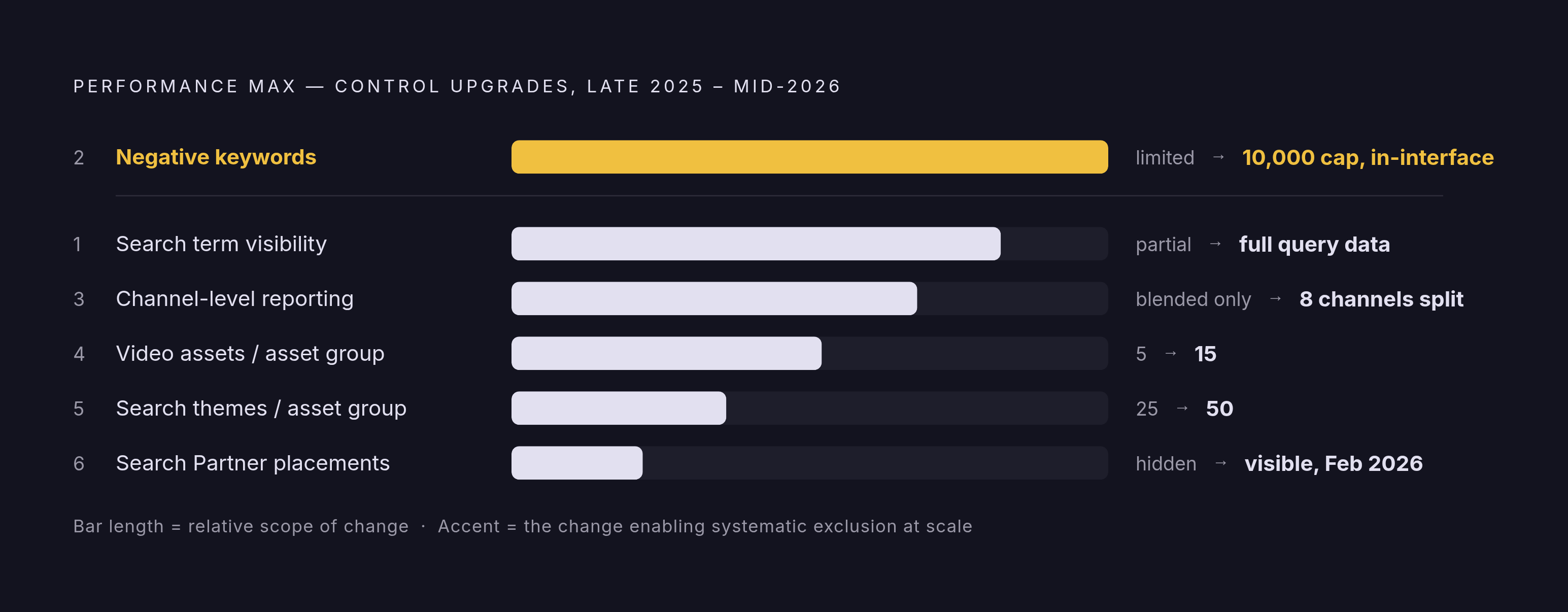
Late 2025 through mid-2026 brought the biggest batch of PMax changes since the campaign type first launched, and they were not released as isolated features. Each one makes the others more useful. A search term report only matters if you can act on what it shows. A negative keyword limit only matters if you have real query data to decide what to block. These six changes work as a set.
Search term visibility came first and matters most. Before 2025, the report only showed broad categories, not actual search queries. Search Engine Land confirmed that full search term visibility is now built into PMax, putting it on roughly the same footing as a standard Search campaign, with some limits still in place around volume thresholds and blended search and shopping data. By July 2026, this had rolled out even to accounts spending modest daily budgets, not just the largest advertisers.
Negative keywords moved from a favor to a feature. Adding a negative keyword to PMax used to mean contacting a Google rep and waiting. Now it works directly inside the interface, the same way it does for Search or Shopping campaigns, and the cap is 10,000 negatives, large enough to support systematic exclusion rather than occasional cleanup.
Search themes, the closest thing PMax has to keyword targeting, doubled from 25 to 50 per asset group. With 50 themes instead of 25, you can split asset groups by product line, persona, or buying stage with much finer intent splits.
Video assets tripled, going from 5 to 15 per asset group. You now have enough room to run real creative variant testing across YouTube, Shorts, Discover, and Gmail surfaces.
Channel-level reporting ended the blended totals. Spend, impressions, clicks, and conversions now break out by channel, Search, Shopping, Display, YouTube, Discover, Gmail, Maps, and Search Partners, instead of arriving as one undifferentiated number.
Search Partner Network placements became visible too, confirmed in February 2026. PMax campaigns now show these placements inside the "When and where ads showed" report, closing a gap advertisers had been asking Google to fix for years.
What the new visibility still does not show
None of this means PMax turned into a fully open book. What remains hidden deserves just as much attention as what became visible.
Two gaps stand out. Negative keywords still cannot be applied at the asset group level, only at the campaign level and the account level. That limits how finely an advertiser can separate intent tiers inside one campaign, something Search handles naturally through separate ad groups. The second gap: PMax still has no individual keyword targeting. Search themes shape the territory PMax hunts in, but they don't function as keywords, and there's no way to add or manage them the way Search campaigns do.
These gaps carry real weight for B2B accounts running several asset groups across different products, personas, or funnel stages. Block a term at the campaign level, and it gets blocked for every asset group in that campaign, even the ones where that term might have been useful. That's a blunt instrument doing a job that calls for a scalpel. Knowing this upfront matters, because it shapes how the workflow sections below should actually be built.
How cannibalization between PMax and Search campaigns works
Running PMax next to Search campaigns introduces a risk that has nothing to do with irrelevant queries. The real danger is PMax quietly serving for queries that a Search campaign should be winning, which erodes the conversion rate advantage and the clean data that Search was built to provide.
The mechanism is that when PMax and a Search campaign are both eligible for the same query, PMax does not reliably lose that auction. When PMax wins it instead, the advertiser gives up message precision, keyword-level data, and the ability to trace the conversion back to a controlled campaign structure. PMax then gets credit for a conversion that a Search campaign would likely have delivered more efficiently and more cheaply.
This isn't a rare edge case. An Optmyzr study covering more than 500 accounts found that the large majority had keyword overlap between Search and PMax, with more than half of Search campaigns showing that overlap. In accounts running both campaign types, cannibalization is closer to the default condition than an exception.
A few signals in the account data point to this happening. Search campaign impression share can decline even with budget untouched. PMax search conversions can climb while total account conversions stay flat, which means PMax is just relabeling conversions Search would have captured anyway. And as PMax picks off the easier, closer-to-conversion queries, Search cost per acquisition can start rising, since Search is left with the harder, more expensive remainder.
None of this is an argument against running PMax. It's a structural problem with a direct fix, and that fix is exactly what the new negative keyword capability was built to solve.
Using the 10,000-negative limit and the search term report together as a workflow
The search term report and the 10,000-negative limit only pay off when used together. The report tells an advertiser what to exclude. The expanded limit gives enough room to exclude it at scale, instead of running into a ceiling after a few hundred entries.
The direct fix for cannibalization is to take the core keywords already running in a Search campaign and add them as negatives inside PMax, so PMax stops competing for queries the Search campaign should own.
From there, the search term report becomes a filter for everything else that doesn't belong. Informational searches, job seeker queries that have nothing to do with the product, competitor names where brand association could backfire, and categories unrelated to what's actually being sold appear in the report once it's visible, and all of them are candidates for exclusion. Watch branded competitor terms closely, since they tend to inflate click volume without improving the quality of the leads coming through. Searches from people who are already customers belong on the exclusion list too, since spend aimed at an audience already inside the funnel is spend wasted on a conversion that was happening anyway.
JumpFly recommends checking search terms weekly at first, then shifting to monthly once results stabilize, since the worst mismatches tend to surface fast in the first few weeks of review. That early period is where the biggest waste usually hides.
One caution matters here, and it cuts against the instinct to exclude aggressively. Google's system sometimes keeps lower-performing search terms running because they support higher-value conversions indirectly, through audience learning the advertiser can't fully see. Over-applying negatives can shut down query territory that was quietly contributing to results. The discipline is to cut clearly irrelevant patterns and stop there, rather than trying to recreate keyword-level precision across an entire PMax campaign. That restraint is as much a part of the workflow as the exclusions themselves.
Channel-level reporting opens a parallel track. If Display spend is running high relative to what it's actually contributing in conversions, the fix is placement exclusions and tighter audience signals, since Google doesn't allow a hard budget cap at the individual channel level. Same report, same logic, different lever.
Clean conversion signals as a prerequisite for B2B accounts
A fair question to raise before any of this feels like progress: does better visibility actually fix anything if the algorithm is optimizing toward the wrong outcome in the first place?
Query exclusions only manage what PMax serves against. If the conversion event feeding the algorithm is a basic form fill rather than a qualified lead, tighter query targeting will cut waste without touching the deeper problem, since the algorithm keeps training itself to find more of exactly the low-intent form fillers it's already optimized for.
This occurs constantly in B2B accounts. PMax tends to generate more total conversions than a well-managed Search campaign, but the lead quality running through those conversions tends to be lower, because the algorithm optimizes for volume on whatever action it's told to chase, and a form submission isn't the same thing as a pipeline opportunity.
The fix sits upstream of the campaign settings entirely. Offline conversion tracking, feeding sales-qualified lead or pipeline data back into Google Ads from the business's own CRM, teaches the algorithm what an actual lead looks like, rather than what a form submission looks like. Magiclogix sets a practical threshold here: an account needs enough conversions per month at that optimization event before switching to target CPA bidding, because below that volume, the algorithm doesn't have enough signal to learn anything reliably.
PMax's revenue contribution in at least one documented life sciences case took close to a year to become fully visible, a reminder that this kind of compounding effect runs on patience as much as configuration. Search term visibility and negative keywords matter, but they're refinements layered on top of a signal that has to be trustworthy first. Get the measurement architecture right, and the query-level work that follows actually compounds. Skip that step, and the account is just getting faster at optimizing toward the wrong outcome.
This is also where judgment becomes unavoidable. Deciding whether a flat metric reflects a query problem, a conversion-signal problem, or a creative problem takes someone accountable for the diagnosis, not just someone with dashboard access.
Where AI Max for Search fits relative to PMax
A natural question follows from everything above: if AI Max for Search offers smarter query matching and better negative keyword tools, does it replace PMax, or does it sit somewhere else in the stack?
AI Max for Search and Performance Max are architecturally distinct, and conflating them leads B2B advertisers to sequence their campaigns in the wrong order. AI Max is a set of AI features added on top of existing Search campaigns, improving query understanding, generating ads dynamically, and strengthening negative keyword controls at both the campaign and ad group level, with search term reporting that stays transparent throughout. It became generally available in April 2026. Performance Max, by contrast, is a standalone campaign type that spans every owned Google channel at once.
AI Max gets much of the same long-tail query expansion that PMax offers, but it keeps that spend inside the Search network rather than spreading it across channels. That means incremental reach without taking on the cross-channel opacity that still defines PMax.
Before you flip AI Max on for an existing Search campaign, one caution matters. Campaigns built carefully around exact match keywords lose that structure the moment AI Max activates, because exact, phrase, and broad match all start behaving the same way. Months of intent-tier segmentation can disappear in a single settings change.
A sensible activation order for B2B accounts follows from this. Start with high-intent Search campaigns running on their own. Layer AI Max onto medium-intent Search campaigns next. Only bring PMax into the account once Search campaigns are already using up their available impression share or hitting a cost-per-acquisition ceiling they can't push past. PMax works best as the next lever to pull once Search has run out of room, before being added by default to an account still growing on its own.
Turning PMax visibility into compounding campaign intelligence
All of this points to a question that no feature list answers on its own: who is actually going to sit with this data every week and act on it?
The 2026 controls demand constant attention. Weekly search term review, ongoing negative keyword updates, regular audits of conversion signals, and monitoring for cannibalization all need to happen continuously, alongside the judgment to tell a query problem apart from a creative problem or a landing page problem.
That diagnostic judgment is where most B2B accounts actually lose money. A dashboard will show that a metric dropped. It won't tell anyone why. Pulling the wrong lever in response, cutting a query that wasn't really the issue, or rebuilding asset groups that didn't need rebuilding, burns both time and budget chasing the wrong cause.
The advertisers sophisticated enough to demand these controls from Google are also the only ones equipped to use them well. The tools only compound in value inside an organization built to act on what the data shows week over week, not one that opens the reports once a quarter.
Some of this work can run on automation. If a system tracks search terms continuously, applies negatives as patterns emerge, and feeds offline conversion data back weekly, it can handle the mechanical side without much friction. But the harder calls, whether a weak-looking term is secretly supporting conversions elsewhere, whether asset groups need restructuring, whether PMax should be running at all given the current state of conversion tracking, call for a named person accountable for the outcome. The visibility finally exists. What an account does with it still comes down to who's watching, and how closely.
Sources
- Performance Max Search Term Visibility Available to All Advertisers
- Google adds Search Terms visibility to Performance Max campaigns
- Visibility in Performance Max: Search Terms & Negative Keywords
- Performance Max 2026 Updates: New Controls & Features
- Performance Max reporting for ecommerce: What Google is and isn't showing you
- Google Performance Max Now Shows Search Partner Placements: Complete Analysis of the February 2026 Transparency Update