Google Ads Audience Targeting Options for B2B Buyers
Customer Match and segmented remarketing are the only reliable paths to B2B pipeline quality.

If you've spent any meaningful time running Google Ads for a B2B company, you've probably had this experience: the campaign looks healthy on paper. Clicks are coming in. CTR is decent. Then you pull the lead quality report and half the pipeline is garbage. Students. Competitors. People who were never going to buy.
The most reliable path to B2B pipeline starts with Customer Match and segmented remarketing, and it depends as much on exclusions as on inclusions. Upload your target account domains and CRM contacts via Customer Match so budget concentrates on known organizations rather than spraying across a broad category. Segment remarketing by page depth, separating homepage bouncers from pricing page visitors and demo form abandoners, then bid aggressively only on the highest-intent groups. Layer exclusions on top: suppress current customers, low-intent bouncers below a defined time threshold, and competitor employee lists where identifiable, because every dollar spent on students, job seekers, and competitors clicking your ads is a dollar not spent on an actual buyer.
That's not a bidding problem. That's an audience problem.
Google's ad platform was built for consumer intent at massive scale. Think millions of people searching for shoes, flights, and streaming subscriptions. B2B advertisers inherit that infrastructure and then have to work against its grain. Small addressable markets. Long sales cycles. Multiple stakeholders involved in a single purchase decision. No reliable job title signal baked into Google's data graph.
So what does "converting impressions into pipeline" actually require in B2B? Three things, all at once: reaching the right person, at the right company, at the right moment in their buying journey. Miss any one of those three and you're just generating expensive traffic.
Here's what makes this more urgent right now. Since mid-2024, organic clicks on searches featuring Google's AI Overviews have dropped significantly, and paid click volumes have compressed too. When overall traffic shrinks, precision doesn't become less important. It becomes the whole game.
The six audience types Google offers are not a buffet. You shouldn't sample from all of them and hope something works. Each one serves a different funnel stage and a different account-based marketing use case. Conflating them is one of the most reliable ways to burn budget quietly, month after month, without understanding why.
Let's walk through all six. Then we'll get into how to combine them.
The Six Audience Targeting Types Google Ads Offers, Defined
Before we evaluate anything, let's just get the definitions straight. No judgment yet. Just mechanics.
Affinity segments. These are based on long-standing interests and lifestyle signals. Google infers them from browsing patterns over time. "Business Professional" is an affinity segment. So is "Technology Enthusiast." Broad by design, built for reach.
In-market audiences. These capture users Google believes are actively researching a product or service category right now, based on recent search and browsing behavior. It's updated continuously. The intent signal is more immediate than affinity.
Custom segments. This is where it gets interesting. Custom segments are advertiser-defined. You build them by inputting URLs people have visited or search queries people have recently entered. Google then finds users who match that behavioral profile. The most configurable option in the toolkit.
Customer Match. You upload first-party data from your CRM: emails, company domains. Google matches those against its logged-in user graph and serves ads to those people across Search, Display, and YouTube. This is your owned data working inside Google's ecosystem.
Remarketing and RLSA (Remarketing Lists for Search Ads). These reach people who have already interacted with your own properties: your website, your app, your YouTube channel. They already know you exist. The question is how well you know them.
Similar segments. Google builds lookalike audiences off your Customer Match lists or remarketing seeds. The idea is to find people who look like your best existing visitors or contacts.
One more thing worth understanding before we go further: there are two modes for applying any of these audience types.
- Targeting mode: restricts delivery only to people in that audience
- Observation mode: collects performance data on how that audience behaves without restricting who sees your ads
That distinction shapes every deployment decision we're about to discuss.
And one recent platform update that matters: Custom Segments became available for Display campaigns in December 2025. Before that, GDN audience targeting was a blunt instrument. Now it's meaningfully more precise. That changes how you think about mid-funnel display for B2B.
Customer Match and Remarketing: The Two Types That Reliably Produce Pipeline
These two aren't the flashiest options in the platform. But they're the ones that actually move pipeline. Why? Because both use known behavioral data rather than probabilistic inference.
With Customer Match, Google knows you have a relationship with that person. With remarketing, that person already self-selected by visiting your site. Neither one requires Google to guess.
Customer Match as ABM Infrastructure
When you upload target account domains or contact emails, you're telling Google: serve ads to these organizations, across Search, Display, and YouTube. Budget concentrates on exactly the right accounts rather than spraying across an industry category and hoping the right person shows up.
Best use cases:
- Known target account lists from your ABM program
- Existing pipeline contacts who've gone quiet
- Renewal and expansion plays where you want to stay top of mind
One practical caveat: match rates depend on how well your CRM emails align with the Google accounts those people are actually logged into. Business emails often underperform personal emails in matching. Expect imperfect coverage. That's not a reason to skip Customer Match. It's a reason to supplement it with other layers, which we'll get to.
The other reason to prioritize Customer Match: it's the primary Google mechanism that survives a cookieless environment. As privacy regulations continue tightening, first-party data isn't just a competitive advantage. It's infrastructure.
Remarketing: The Most Expensive Mistake Is Treating It as One Audience
This is where most B2B teams leave money on the table. They set up a single remarketing audience of "all website visitors" and call it done.
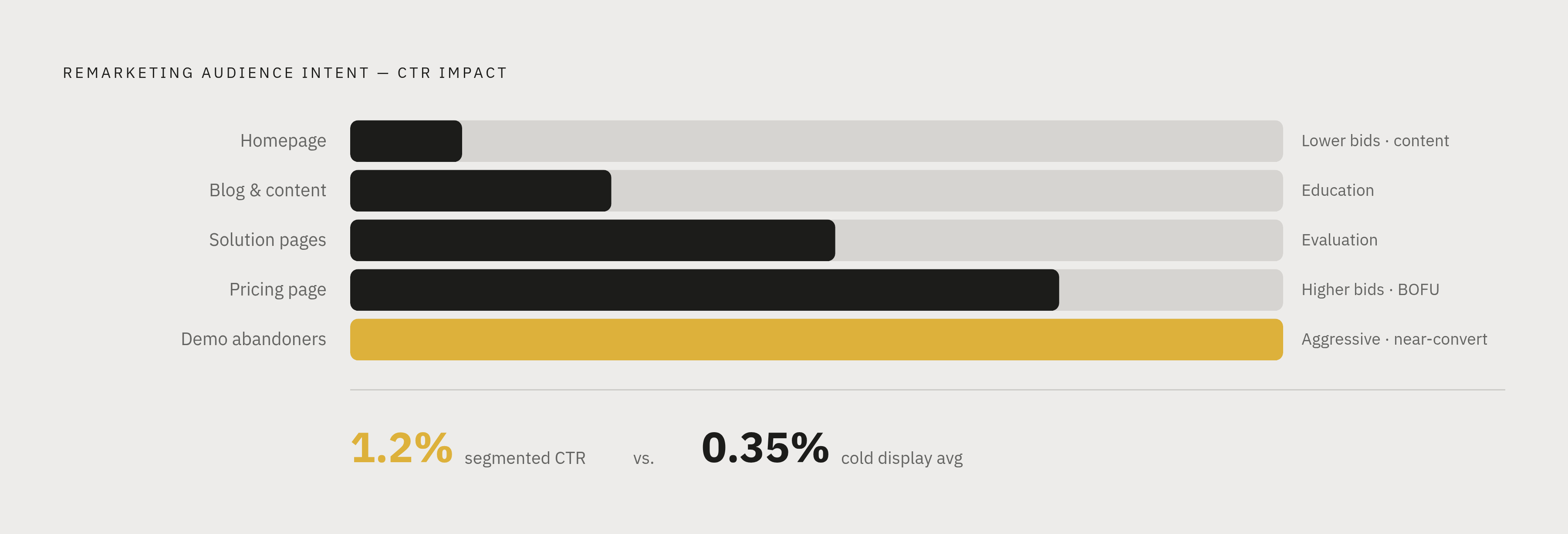
But think about what that bucket actually contains. Someone who bounced from your homepage after eight seconds. Someone who spent four minutes on your pricing page and started filling out a demo form before closing the tab. Those are not the same person. They should not see the same ad. They should not be bid on at the same level.
A segmentation structure that actually works:
- Homepage visitors (low intent)
- Blog and content visitors (education stage)
- Solution and product page visitors (evaluation stage)
- Pricing page visitors (high intent)
- Demo form abandoners (near-conversion)
The data on this is worth paying attention to. Segmented remarketing benchmarks from B2B SaaS research show in-campaign CTR can reach around 1.2%, compared to a Display average closer to 0.35% for cold audiences. CPL runs meaningfully lower than cold prospecting campaigns. And when implemented correctly, the CPA differential is significant.
That segmentation pays for itself: high-intent segments justify aggressive bids and bottom-of-funnel creative. Low-intent segments warrant lower bids and content-forward messaging. Running them together at the same bid and message destroys the signal.
Custom Segments: The Most Underused Precision Tool for Reaching B2B Buyers
Custom segments don't get enough credit in B2B circles. Maybe because they take more work to set up thoughtfully. Maybe because the logic isn't as intuitive as "upload your CRM list." But for reaching buyers who don't yet know your brand exists, they're the most configurable tool you have.
There are two distinct strategies inside Custom Segments, each targeting a different buyer moment.
Competitive strategy. You add competitor URLs and category-related keywords. Google finds users who have recently visited those sites or searched those queries. You're reaching buyers who are actively shortlisting vendors.
Categorical strategy. You add problem-description keywords: "CRM for SaaS," "churn reduction software," "manufacturing ERP system." You're reaching buyers who are researching the category but haven't yet formed a vendor shortlist.
To understand why this works, consider the actual research path your ICP takes. If you're selling ERP software to mid-market manufacturers, your buyer reads industry trade publications, visits established vendor sites to understand pricing and features, and uses review platforms to compare options side by side. Custom Segments lets you intersect that path. You're not waiting for them to search your brand name. You're meeting them where their research is already happening.
Speaking of review platforms: inputting URLs from G2, Capterra, TrustRadius, and similar sites is one of the higher-leverage moves in a B2B Custom Segment strategy. Users actively comparing vendors on review platforms are at high purchase intent. They're rarely captured by keyword campaigns alone because they're often not yet searching for your specific product name.
One honest limitation to name here: Custom Segments don't guarantee company-level targeting. The intent signal is strong, but the user pool includes individuals at companies that fall outside your ICP. Where possible, pair Custom Segments with demographic layering by industry or company size to tighten the cohort.
Best funnel moment: mid-funnel awareness and consideration, for buyers who are in-category but not yet on your radar.
In-Market Audiences: Useful as a Layer, Not a Foundation
In-market audiences do capture something real. The conversion rate lift they produce is documented. The intent signal reflects genuine, recent research behavior. That part works.
The structural problem for B2B is different. Google's predefined in-market segments were built for scale across millions of advertisers. That means they're deliberately broad.
Here's a concrete example of the mismatch. An in-market segment for "Business Software" or "Enterprise Resource Planning" will include IT coordinators doing general research, consultants writing reports for clients, students completing coursework, and the occasional CFO at a mid-market manufacturing company who is your actual buyer. You can't separate those people from inside the segment. You're paying for all of them.
That raises an important question: does that mean you ignore in-market audiences entirely? Not quite.
The right deployment model is observation mode. Run in-market audiences as an observation layer on existing Search or Display campaigns. Collect data on whether in-market users convert better than your average visitor. If they do, adjust bids accordingly. If the quality doesn't hold up downstream, you have the data to prove it and you haven't restricted delivery based on a signal that turned out to be noisy.
Stacking in-market with tighter signals, like Customer Match exclusions or custom segment overlap, improves the quality of your in-market cohort without abandoning its reach entirely.
Affinity Segments and Similar Segments: When Reach Trades Away Relevance
These two deserve to be discussed together, because they share the same fundamental risk: the further you get from known behavioral signals, the more reach you buy at the cost of relevance.
Affinity Segments
"Business Professional" as a targeting segment sounds relevant for B2B. It is not a buying committee. It's a population of hundreds of millions of people who have shown some interest in professional topics over time.
Affinity segments are rarely worth targeting in isolation for B2B pipeline campaigns. Budget spent here directly competes with budget spent on Customer Match and RLSA, which we've already established are the reliable pipeline drivers.
One defensible use case: pairing affinity segments with precise keyword targeting on Display, so you're narrowing delivery to content-relevant environments while also filtering for professional interest. The combination does some work that neither does alone. But if your goal is qualified leads, this is an awareness play, not a pipeline play.
Similar Segments
The concept is appealing. Google builds lookalike audiences from your remarketing lists or Customer Match uploads, finds people who look like your best existing contacts, and serves them ads.
The problem is in the seed list quality. And this is where you have to be honest with yourself about what's actually in that seed list.
Your website visitors include competitors checking your pricing page. Job seekers looking at your careers page. Researchers writing industry reports. Students. Partners. Former customers. "Similar to your website visitors" inherits all of that noise and then amplifies it at scale.
If you're going to test Similar Segments at all:
- Run in observation mode first
- Track lead quality downstream, not just CPL
- A cheaper CPL from unqualified leads is a budget drain, not a win
Similar Segments built from Customer Match (your actual target account lists) are meaningfully cleaner seeds than those built from general website traffic. If you're going to test the type, start there.
How Funnel Stage Should Determine Which Audience Types Get Budget
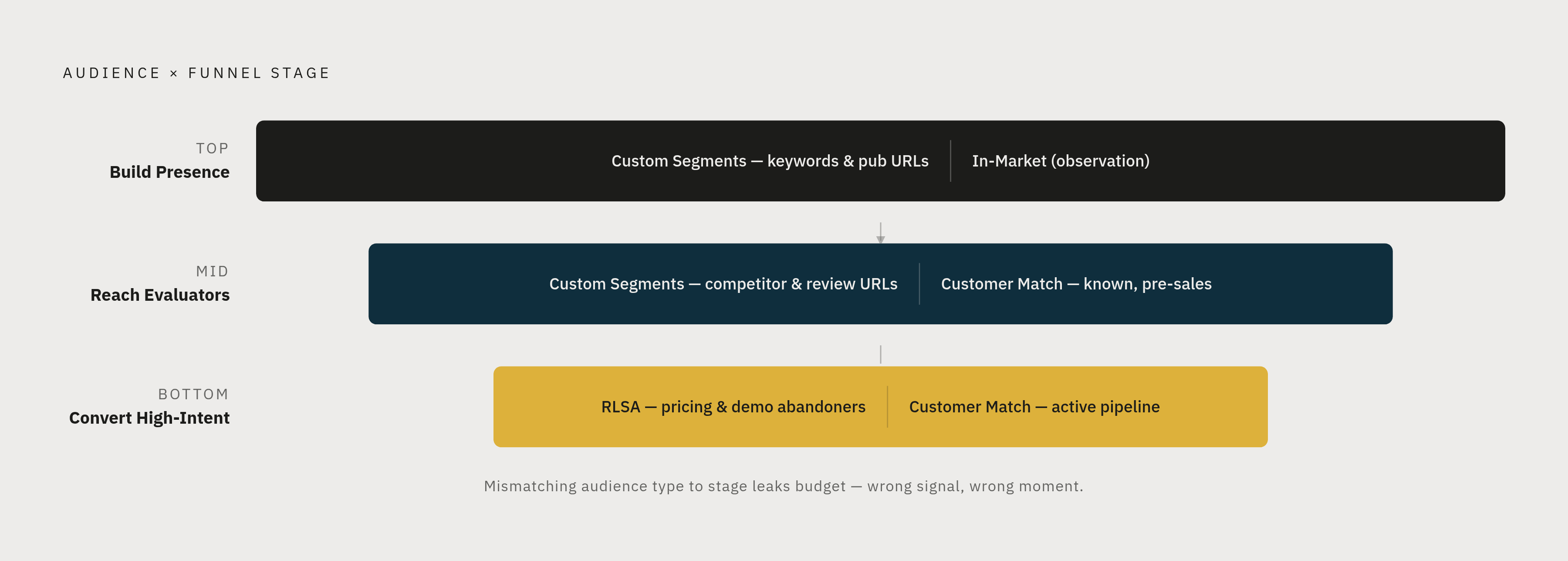
The core principle is simple to state and easy to violate: audience type and funnel stage must match. Using a high-intent audience type with a cold awareness message wastes the relationship. Using a broad affinity audience on a bottom-funnel offer wastes the intent. Both are budget leaks.
Here's how to think about allocation by stage:
Top of Funnel: Building Presence Before Buyers Are Searching
What you're trying to do: Get on the radar of buyers who don't yet know your brand exists.
Audience types that fit:
- Custom segments (categorical keywords, industry publication URLs) on Display and YouTube
- In-market audiences in observation mode to see which segments self-select
What you're not doing yet: asking for a demo. The message should match. Brand awareness and problem framing, not conversion offers.
Mid-Funnel: Reaching Buyers Who Are Actively Evaluating
What you're trying to do: Intersect buyers who are comparing options, including your competitors.
Audience types that fit:
- Custom segments built from competitor URLs and review site URLs (high purchase intent, vendor comparison stage)
- Customer Match for known contacts at target accounts who haven't yet entered sales conversations
Creative should reflect: differentiation, proof, case studies. These buyers are doing homework. Give them something that holds up to scrutiny.
Bottom of Funnel: Converting High-Intent Visitors and Known Accounts
What you're trying to do: Close the gap for people who are close.
Audience types that fit:
- RLSA segmented by page depth and intent signal (pricing page visitors, demo form abandoners)
- Customer Match for active pipeline contacts, keeping your brand present during long sales cycles
Bidding logic: aggressive bids on the highest-intent RLSA segments are justified. The data from your segmentation already shows the CPA differential. Use it.
One additional layer worth naming for enterprise campaigns: IP-range targeting for specific organizations ensures delivery to employees on corporate networks. It supplements Customer Match coverage gaps where email match rates fall short.
One data threshold to respect across all of this: audience segmentation only becomes statistically reliable at around 30 to 50 conversions per period per segment. Below that, run in observation mode. Let the data accumulate before you restrict delivery. Acting on thin data is one of the most common ways smart B2B teams make expensive decisions.
What Google's 2025 Platform Changes Mean for How B2B Teams Set Up Audience Targeting
The platform is moving. Some of these changes affect how you structure campaigns at a foundational level.
AI Max for Search
AI Max changes the campaign architecture assumption most B2B teams have been operating on. Instead of building separate campaigns for each audience segment, AI Max uses real-time signals (search intent, landing page content, user behavior) to adapt ads dynamically.
The implication: audience lists become signals fed into the campaign model rather than hard targeting restrictions. Google's system handles the arbitration in real time.
B2B teams should test AI Max with strong audience signals loaded in. Customer Match lists, segmented RLSA. The model needs good signal data to outperform manual segmentation. Feeding it garbage signals produces garbage outputs. Feed it your best first-party data and let it work.
Performance Max Transparency
For a long time, Performance Max was effectively a black box. Budget went in, results came out, and you had limited visibility into which placements were actually driving qualified conversions.
Google now provides channel-level reporting for PMax, showing budget performance across Search, Display, YouTube, Discover, Gmail, and Shopping, broken down by format. That matters. Before this update, you couldn't tell whether your monthly PMax budget was generating leads from YouTube pre-roll or Gmail promotions. The reporting gap made audience optimization nearly impossible.
With channel-level data, you can identify which placements drive qualified conversions and feed that back into your audience strategy. That feedback loop is what was missing.
B2B Demographic Targeting Expanded
2025 updates added company size and industry as targeting dimensions within Google Ads. For B2B campaigns that need to filter by organizational characteristics rather than individual behavior alone, this is meaningful. It's not a replacement for Customer Match or RLSA. It's a useful additional layer.
Smart Bidding Dependency
Maximize Conversions and Target CPA are now default bidding strategies. They only perform well with reliable conversion data underneath them. That 30 to 50 conversion threshold per segment isn't a best practice suggestion. It's a prerequisite. Without it, the bidding model is optimizing on noise.
The AI Overview Effect on Placement
Ads appearing within AI Overviews receive significantly more attention than those appearing in standard positions. Audience targeting now influences not just who sees your ad, but where in the search result it appears. Reaching the right audience with the right signals isn't just a quality question anymore. It's a placement question.
How Do You Stop Students and Competitors From Draining Your B2B Ad Budget?
This is the part most B2B teams underinvest in. And it might be where the biggest quality improvements are hiding.
B2B campaigns bleed budget on the wrong people when exclusions aren't systematic. Competitors check your pricing page. Job seekers click your ads looking for work. Students research your category for school projects. Existing customers click through and inflate your CPL without contributing to new pipeline. All of them cost you money.
Standard exclusion layers for B2B pipeline campaigns:
- Current customer lists from CRM (via Customer Match): suppress them from prospecting campaigns, or create a separate campaign serving renewal and expansion creative
- Competitor employee lists where identifiable: prevents budget spent on people who will never buy
- Low-intent RLSA segments: homepage bounces under a defined time threshold excluded from high-bid ad groups, protecting budget for higher-intent visitors
One more layer that gets filed under "audience work" but is really about hygiene: placement exclusions on Display. Even with strong audience targeting, delivery can land on low-quality inventory. Mobile app placements, gaming sites, content farms. A placement exclusion list is part of the audience stack, not a separate workstream.
But what if you think about it from the other direction? Inclusions tell Google who to reach. Exclusions tell Google who to avoid spending money on. In a market with small addressable audiences and long sales cycles, every dollar spent on the wrong person is a dollar not spent on the right one.
The negative stack doesn't get a dashboard widget. It doesn't produce a flashy metric you can screenshot for a monthly report. But it is quietly one of the highest-leverage things you can do for campaign quality. The teams that treat exclusions as an afterthought are the ones who can't figure out why their CPL keeps climbing even as their targeting looks correct on paper.
The audience you're not reaching is only half the equation. The audience you're actively refusing to spend on is the other half. Both decisions shape the quality of what's left.