B2B Google Ads Audience Targeting Using First-Party CRM Data
Upload your CRM data to reach the right buyers at each stage of their decision.

This article is about the mechanics of B2B Google Ads targeting when you connect it to your CRM. Not the theory, not the strategy deck version. The actual steps: what to upload, how to segment it, and what each layer of CRM data unlocks that keyword targeting alone never could.
Here's the problem it's solving. B2B buying cycles are long, involve a handful of stakeholders, and most of the research happens before anyone fills out a form or talks to sales. By the time a prospect shows up in a demo, they've already read the comparison pages, watched the webinar, and made half the decision without you.
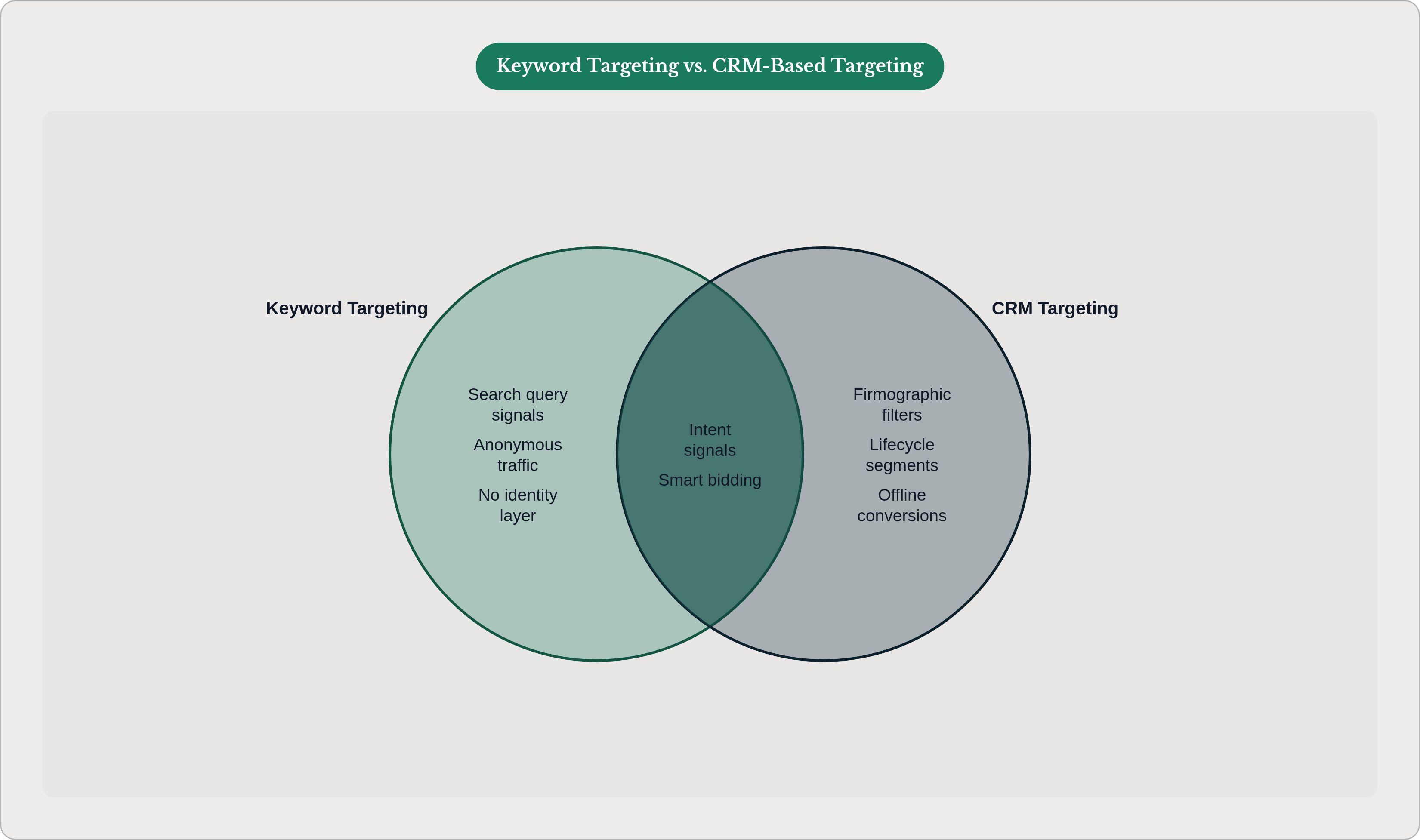
Keyword targeting has no idea any of that happened. It sees a search query. That's it. No identity, no company, no stage in the funnel. Which means the same ad, at the same cost, reaches a college student researching a term paper and a VP at your dream account who's three weeks from signing a contract. Google can't tell them apart. Worse, in a rising CPC environment, you're paying more per click every quarter for an audience you still can't qualify.
The keywords aren't the problem. The absence of identity is the problem. CRM data is the layer that fixes that, and the rest of this piece is about how to actually wire it in.
What Google's Customer Match actually does with CRM data
Customer Match is Google's tool for uploading your own contact data (email, phone, name, mailing address) in hashed form so Google can match it against signed-in Google accounts. Hashed just means scrambled in a way Google can compare without seeing the raw data. Nobody's reading your CRM.
Once a list is matched, you can do three things with it:
- Target it directly (show ads specifically to people on that list).
- Exclude it (keep ads away from people already in your pipeline or already customers).
- Build a similar segment (use the list as a seed so Google finds new people who look like the ones on it).
A few things worth knowing before you get your hopes up:
- Match rate depends on how much data you give it. Email alone gets you a modest match rate. Email plus phone plus name plus address performs meaningfully better. If your CRM only has email addresses, expect a lower match rate and stay calm when the number looks lower than you hoped.
- There's a minimum list size. Google won't activate a list that's too small, and a bigger seed list makes the similar-segment audience more reliable. Small lists aren't just underpowered, they're often not usable at all.
- Lists go stale. Customer Match membership only lasts so long before it expires, so a one-time upload quietly decays. If your CRM isn't syncing on a schedule, your "audience" from six months ago barely resembles your audience today.
- It targets people, not companies or titles. Customer Match has no idea what someone's job is or what industry their company operates in unless you've already filtered for that upstream in your CRM. This is the detail that trips people up the most, so let's go there next.
How to segment CRM records before they become audience lists
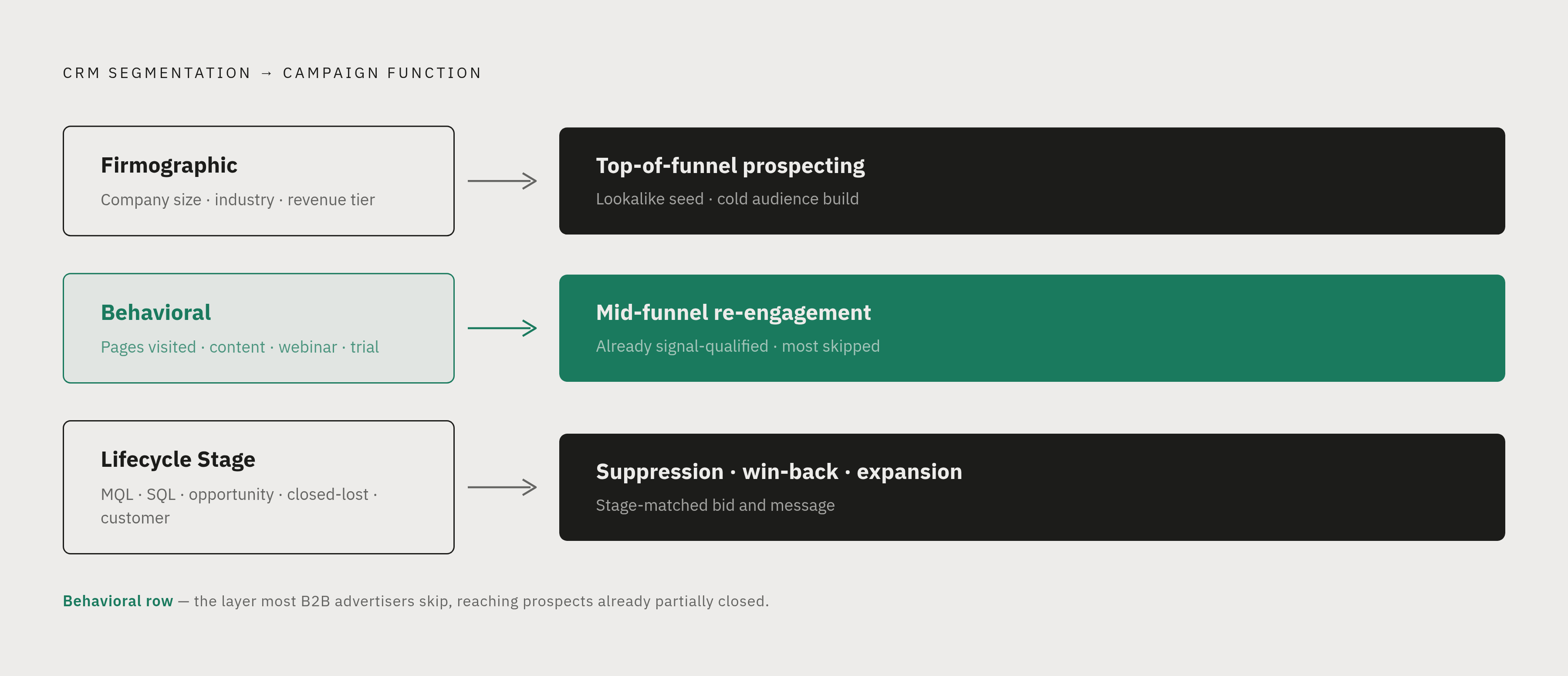
Here's the part everyone skips because it's less fun than looking at an ads dashboard: the actual thinking happens in the CRM, before anything gets uploaded. Google just executes whatever list you hand it. Garbage in, garbage targeted.
There are three axes worth segmenting on, and each one unlocks a different kind of campaign.
Firmographic (company size, industry, revenue tier, geography). This tells you whether a contact fits your ideal customer profile at all. A firmographic list is your best raw material for prospecting and for building lookalike seeds, because it's filtered for "does this even look like our customer" before you spend a dollar reaching them.
Behavioral (pages visited, content downloaded, webinar attendance, product trial usage). This tells you how warm someone is. Behavioral lists are built for mid-funnel retargeting, where you can write copy that assumes some familiarity instead of starting from zero.
Lifecycle stage (net-new prospect, MQL, SQL, open opportunity, closed-lost, existing customer). This tells you where someone sits in your funnel right now. Lifecycle lists are mostly used for suppression (avoid advertising to people already in active deals or already customers), win-back (closed-lost contacts worth another shot later), and expansion (customers ready for an upsell conversation).
One more thing that quietly matters a lot: enrichment. If your CRM record only has a personal email and nothing else, appending a verified work email, phone number, or job title before export raises your Customer Match hit rate and sharpens your lookalike seed. It's unglamorous data hygiene work, but it's the difference between a list that performs and one that limps along under the activation threshold.
Speaking of which: if a segment is too small to activate on its own, hold off on forcing the upload. Consolidate it into a broader ICP segment, or enrich it further, before you try again.
Building the audience architecture: which lists go where in the campaign structure
Different segments need different homes. A firmographic ICP list and a closed-lost list should never live in the same campaign, because they need different bids, different messages, and different definitions of what counts as a win.
Top-of-funnel prospecting is where your ICP customer lists earn their keep as lookalike seeds, reaching net-new people who resemble your best existing customers. Layer that audience signal on top of keyword intent, so you're not just catching anyone who searches a relevant term, you're catching ICP-shaped people who search it. And exclude current customers and open opportunities here. There's no reason to pay for a click from someone your sales team is already talking to.
Mid-funnel re-engagement is where behavioral lists go: site visitors who hit high-intent pages, people who downloaded a gated report, webinar attendees. These people already know who you are, so the messaging can skip the introduction and get to the ask. And because their odds of converting into real pipeline are meaningfully higher than cold traffic, it's often worth bidding more aggressively here. You're not paying for awareness, you're paying to close a gap that's already mostly closed.
Suppression is the lever most accounts underuse. Three groups belong on suppression lists:
- Active open opportunities, so you're not burning budget while sales is already in the room.
- Current customers, at least for acquisition campaigns (they can live in a separate expansion campaign with different messaging).
- Disqualified leads, suppressed permanently, so they don't quietly pollute your other segments.
Closed-lost reactivation deserves its own standalone campaign, especially if your CRM tracks loss reason. Not all losses are equal. Someone who said "timing wasn't right" or "budget got cut" six months ago is a very different prospect than someone who picked a competitor outright. Segment by reason, and revisit the timing-related losses on a six-to-twelve month clock.
Closing the loop: sending CRM conversion signals back to Google
Here's a question worth sitting with: what does Google actually know about whether your leads are any good?
By default, not much. Google sees clicks and whatever conversion event you've told it to track, usually a form fill. It has no idea whether that form fill turned into a real sales conversation or vanished into the void. That gap is exactly what offline conversion import is built to close.
When a lead moves to MQL, SQL, opportunity, or closed-won in your CRM, that event can be sent back to Google Ads and matched to the click that started it. Once that pipe is flowing, a few things start happening:
- Smart bidding optimizes toward qualified pipeline, not just form submissions.
- Campaigns that generate a lot of cheap, low-quality leads start losing budget to campaigns that generate fewer, better ones.
- Your account builds up an actual track record of what a good conversion looks like for your specific business, not some generic template.
Enhanced conversions add another layer, supplementing click tracking with hashed first-party data submitted at the moment of conversion. This matters more than it used to, because cookies get blocked constantly and a growing share of conversions happen in cookieless environments.
That leads to the underlying infrastructure question: is your tracking client-side or server-side? Client-side pixels miss events all the time now, thanks to browser restrictions and iOS changes. Server-to-server transmission is more reliable because it doesn't depend on a browser cooperating.
And once CRM stage or revenue data is flowing back consistently, you can move to value-based bidding, assigning different dollar values to different stages (an MQL is worth less than a closed-won deal, obviously) so Google optimizes for revenue contribution instead of raw conversion count.
The compounding effect here is real. Every closed deal you import teaches the bidding model a little more about what a good outcome actually looks like. Skip this step, and you're running a smart bidding system with none of the context it needs to be smart.
Using CRM audiences as signals in Performance Max and AI-driven campaigns
Performance Max runs across Search, Display, YouTube, Discover, Gmail, and Maps all at once. You feed it CRM audiences as "signals" inside asset groups, and it uses those signals to figure out where to focus.
Here's the catch, and it trips up a lot of B2B advertisers: in PMax, an audience signal is a suggestion, not a hard boundary. Unlike Customer Match in a Search campaign, PMax can and will show ads to people outside your signal audience if its model thinks they're likely to convert. Which sounds great until you remember its model has no sense of what "likely to convert" means for a business with a six-month sales cycle and a five-person buying committee.
That's exactly why suppression lists matter more in PMax, not less. Without explicit exclusions, PMax can drift toward broad, low-quality audiences no matter what signal you fed it going in.
For most B2B accounts, PMax works best as a complement to dedicated Search campaigns that are still capturing named keyword intent, not a replacement for them. It's especially worth testing when an account doesn't have enough conversion volume for Search alone to optimize well.
AI Max for Search is a newer layer that extends match types with AI-driven query matching and landing page customization. CRM audience signals apply here too, but if your account has low conversion volume, test carefully before shifting real budget over. Automation needs data to learn from, and thin data teaches it the wrong lessons fast.
The underlying principle across all of this: the more CRM signal you feed in, both positive signals (your best customer profiles) and negative ones (disqualified leads, existing customers), the more the automation operates inside boundaries that actually reflect your pipeline. Feed it nothing, and it improvises.
One more format worth knowing: Demand Gen campaigns let you use Customer Match audiences directly for targeting on YouTube, Discover, and Gmail. That's a natural home for your mid-funnel behavioral lists, where you have room for more contextual storytelling than a plain-text search ad allows.
Account-based targeting: approximating company-level reach through contact-level lists
Here's the tension that never fully goes away: B2B deals get decided by committees, often five or more people with different priorities. Google Ads has no concept of a "company." It only targets individuals.
So the workaround is exactly what it sounds like: upload every known contact at a target account. If five people at a company are in your CRM and any one of them searches a relevant term, you've got a shot at a Customer Match. The more contacts from that account you actually have data on, the higher your odds of reaching someone on the buying committee, which is really just enrichment showing up again as the prerequisite for everything downstream.
You can widen the net further with in-market audiences, Google's own classification of users actively researching categories like enterprise software or cybersecurity. Layer that alongside your CRM audience, and you catch stakeholders at target accounts who haven't hit your website yet and aren't in your CRM at all.
Worth saying plainly: LinkedIn does a better job at true account-based targeting than Google does. LinkedIn can target by company name, job title, seniority, and department all at once. Google lacks that capability. That's not a knock on Google, it's just not built for that job. The two platforms play different roles in a coordinated program: Google captures intent from contacts already in your CRM, LinkedIn reaches additional stakeholders at the same accounts who haven't engaged yet, and LinkedIn engagement should feed back into the CRM so those new contacts eventually land on your Google Customer Match lists too.
Maintaining list quality over time: the operational work that determines whether CRM targeting stays precise
Everything above assumes your lists are accurate. They won't stay that way on their own.
People change jobs. Companies get acquired. Deals close, or they go quiet for six months and become something else entirely. A list that was precise the day you uploaded it is quietly wrong within a few months, and nobody sends you a notification when that happens.
Which raises the real question: how often is your CRM actually syncing to Google Ads? A one-time manual upload is basically guaranteed to be stale by the time a campaign has run long enough to draw conclusions from it. Automated sync, whether through a native integration or a connector, should be the standard: weekly at minimum for active pipeline segments, daily if you're running high-velocity programs.
Segment drift is the quiet failure mode here. A contact moves from MQL to SQL to closed-won, but if nobody moves them between audience lists, you're still advertising to a closed-won customer as if they're a cold prospect. That's wasted spend and a slightly confusing user experience for someone who already bought from you.
Watch your match rates over time, too. A meaningful drop is a signal, usually pointing to something in the CRM: an email format change, a domain migration, missing fields creeping in. Catch it there before it degrades the audience further.
And keep an eye on the boring stuff: closed-won customers that never got moved to the expansion list, disqualified leads that never made it to the suppression list. These gaps don't announce themselves. They just sit there quietly wasting money every single day until someone notices.
The bigger point: a well-maintained refresh cycle makes Google's bidding models smarter every time it runs. A neglected list stops helping and actively teaches the model the wrong lesson about what a good conversion looks like. Stale data isn't neutral. It's actively working against you.
What execution at this level of CRM integration actually requires
Here's the honest gap: knowing this architecture and running it are two very different things. Everything described above depends on CRM, ad platform, attribution infrastructure, and campaign structure all staying in sync, and it breaks the moment any one layer gets neglected.
Running it well, in practice, looks like:
- Automated list syncs, monitored for match rate changes.
- Offline conversion imports configured and regularly checked against what's actually happening in the CRM.
- Segment logic updated as your ICP definition or lifecycle stages evolve, because they will.
- Performance judged at the pipeline level, not the click level, which means someone is actually connecting ad platform data to CRM outcomes on an ongoing basis.
And when pipeline contribution isn't moving even though the lists are technically set up, the diagnostic question gets harder, not easier. Is it the lists themselves? The conversion signal feeding the bidding model? The landing page? The bid strategy? Answering that requires someone reading across all of those layers at once, not just squinting at the ads dashboard.
That's really the structural argument for having this run as an ongoing system rather than a one-time setup project. Every campaign cycle leaves behind audience insights, conversion signal history, and segment learnings, but those only compound if someone is actively maintaining the system and acting on what it shows. A DIY setup or a monthly agency check-in tends to install the mechanics once and then let them quietly decay, which is the exact failure mode this whole article has been describing.
At Thunder, this is treated as one continuous system, not a checklist of one-off tasks: CRM integration, list architecture, offline conversion setup, and ongoing optimization run together, maintained by agents governed by an FDM (our internal framework for how decisions get made and checked), not handed off to a customer to babysit or left to an agency's monthly report.
The mechanics in this article are the right mechanics. The real question for any B2B marketing leader isn't whether to build this. It's whether the team running it is built to keep it accurate and compounding, or just built to set it up once and move on to the next thing.